Monday, June 2, 2014
Gigantt is Shutting Down
Dear users of Gigantt,
It is with a heavy heart that I am announcing today that Gigantt is shutting down. Starting from today, new users can no longer sign-up for Gigantt. Existing users, please don't worry, your data is safe and you may export it in a variety of formats. I highly recommend you do that as soon as possible.
I understand these news may raise some questions, so here is my attempt to answer some of them in advance. If your question isn't answered below, feel free to contact me at gigantt@assaflavie.com.
Q: What's going to happen to my work-plans?
A: My intention is to keep the system online for as long as possible, so you could export your plans and migrate to another project-management system. Starting from July 2014 you will have read-only to your existing plans, and you will not be able to make changes to them any more. I encourage you to export your plans sooner rather than later, because from this point on bugs will no longer be fixed and the system will run in a reduced-redundancy mode, which means it might experience periods of unplanned nonavailability. Keeping the system running has a cost and at a certain point it will have to be turned off for good.
Q: How can I export my work-plans?
A: This page explains it all. Open your plan, go to the menu -> plan -> export. There's no option to batch export multiple plans at the same time, so you would have to do this one by one if you use more than one plan.
Q: Is it possible to run Gigantt locally on my own server?
A: Not as is, no. Gigantt was designed to run in the cloud on multiple servers with various roles. Porting Gigantt to an on-premise installation is possible, but requires more work than I can afford to do at this point.
Q: Why are you shutting down??? Gigantt is awesome!
A: Well, thank you, I agree. :) All kidding aside, I am proud of Gigantt. It was an ambitious undertaking - trying to offer the world a new way to manage projects, one that's both fast and easy to learn but also gives you realistic time-estimates for large, complex projects. The bottom line is that not enough people saw the value in that idea, and it eventually became economically unfeasible to continue developing and supporting Gigantt. Naturally, we have put a lot of thought into analyzing this failure, and the full answer to why Gigantt never took off is rather complex. It's not just one thing and to explain all the reasons why it turned out the way it did is a story much longer than can fit in this post.
Q: Will you release Gigantt as open-source?
A: A lot of time and money went into developing Gigantt, and while I cannot afford to continue developing it at this time, I really do wish to get back to it some day. Some great technology has been developed as part of this project, technology that may end up in future commercial endeavors that are proprietary in nature. So the answer, I'm afraid, is no.
Finally, I would like to thank everyone that was involved in Gigantt.
First, our loyal users, some of whom have been using Gigantt for years now, and have been sending us great, encouraging feedback.
To everyone that was part of the Gigantt team over the years, thank you for taking part in this adventure. You've done a great job on a heck a product. Even great products can fail commercially, and this one certainly did not fail because of its quality. I hope that everyone involved has benefited and grown as part of this journey.
To our investors, thank you for believing in us and taking a risk on a first-time entrepreneur. There are a lot of things I could have done better, but picking investors is not one of them. You've been supportive all the way, and I hope to share success with you in the future.
Yours truly,
Assaf Lavie
Founder, Gigantt


Wednesday, April 9, 2014
Pricing for Piracy
A post on my personal blog about why so many feel okay about downloading pirated content and what we can do about it: Pricing for Piracy.
Wednesday, July 10, 2013
Use-Case Apps
I follow Beta List regularly. It tells you about new start-ups in beta stage. I'm an early adopter and I love to try new things out.
Today I saw a post about StoryApp:

Which brings me to my point. So many of the most popular apps nowadays are not a lot more than feature appification. Taking an existing feature from well established, powerful software applications, and building an app around it. Of course you could create the above voice & photo stories without StoryApp. Heck, you could have done it with Powerpoint 15 years ago. But it wasn't as easy and accessible. It also wasn't as affordable. Powerpoint is expensive. You wouldn't buy it just to send someone a few narrated photos. Photoshop is expensive, and not that easy to use. You wouldn't invest your time and money into Photoshop just so you could apply a filter to a photo you took at the beach.
If you think about it, feature appification is almost inevitable in a world of $1 smartphone apps. It's just like what's happening with music. Albums are passé. Why should I pay $15 to get that one song I like plus 12 other songs that I probably don't like as much? Well, people don't, any more... They buy singles, or just particular songs off an album, because they finally have the option to do so, ever since the physical medium was taken out of the equation. Few people think twice before splurging on a $1 app.
People would buy twenty $1 apps before buying one $20 app.
That $20 app might have 20 features, but think of what this means:
 Instagram has one major use-case scenario: Take a picture, add a filter, share it with friends. Instagram is completely optimized for that particular use-case. The user-experience is perfect. The fact that some other photo effects app has the same filters (and more!) doesn't really matter, because it's never going to be as perfect for that use-case as Instagram is.
Use-case apps aren't just an inevitable outcome of a software market that's dominated by $1 transactions. They're also the outcome of a user base that expects nothing less than optimal user-experience. The iPhone has spoiled us rotten. We no longer abide superfluous clicks. Any distraction from what we're trying to achieve means we're switching to another app that specializes in doing what we want.
Taking something big like Photoshop and chiseling away at it until you're left with just one optimized use-case (Instagram) is actually more than just a reductive process. It's not just removing unneeded features; by exposing one particular feature through optimized UI you can also enable completely new use-cases. Take, for example, the number one paid app on the App Store at the moment: iTranslate Voice.
 It translates audio on-the-go. Basically speech-to-text coupled with a translation engine. Neither is an easy feature to implement well, but nonetheless there has been software to do both for quite some time. Crucially, though, these features weren't available to you on-the-go. By packaging them together iTranslate Voice is enabling a completely new use-case: real-time conversations with people who don't share a common language.
 Use-case apps are optimizations and specializations. They take something you could have done with existing software - but didn't - and create a way for you to actually do it. Vine is another great example. It's not just about recording short square videos; it also lets you pause and resume recording with your thumb, thereby giving your video the feel of being edited. Sure, there were video editor apps before Vine, and there were video publishing apps before Vine, but none of them let you create a video that looks "edited" in 10 seconds flat. Optimizing existing features for a particular use-case can create a completely new need. People had no idea they wanted a way to share short, edited, square-sized videos. Now they do. Thus, use-case appification can definitely also be a creative process, not just a reductive one.
I'll leave this as an exercise to the reader: what's the next big use-case app? Take a big, well established piece of software (Microsoft Word?); think of just one use-case for it - something very common (writing a resignation letter?); then quit your job and launch your own use-case app start-up (iResign?).
[StoryApp] enables you to show your friends' photos on your phone by swiping through them, one-by-one, describing what's happening, like in real life. Turning photos into stories.A neat little concept. I mean, I'm not trying to belittle this endeavor. Executing an app like this well takes a lot of talent, and I'm rooting for these guys. Still, it's a very simple concept. Like Instagram - dead simple: take a square photo and add a filter to it. If it catches on, you sell to [some huge company] and light up a cigar. The world wasn't changed in any significant way. Nothing new was invented. It's all packaging.
Which brings me to my point. So many of the most popular apps nowadays are not a lot more than feature appification. Taking an existing feature from well established, powerful software applications, and building an app around it. Of course you could create the above voice & photo stories without StoryApp. Heck, you could have done it with Powerpoint 15 years ago. But it wasn't as easy and accessible. It also wasn't as affordable. Powerpoint is expensive. You wouldn't buy it just to send someone a few narrated photos. Photoshop is expensive, and not that easy to use. You wouldn't invest your time and money into Photoshop just so you could apply a filter to a photo you took at the beach.
If you think about it, feature appification is almost inevitable in a world of $1 smartphone apps. It's just like what's happening with music. Albums are passé. Why should I pay $15 to get that one song I like plus 12 other songs that I probably don't like as much? Well, people don't, any more... They buy singles, or just particular songs off an album, because they finally have the option to do so, ever since the physical medium was taken out of the equation. Few people think twice before splurging on a $1 app.
People would buy twenty $1 apps before buying one $20 app.
That $20 app might have 20 features, but think of what this means:
- There are probably many features you're not going to use at all, and you're paying for them.
- All those unused features crowd the user-interface, making it harder for you to find and use just the feature that you want.
Instagram has one major use-case scenario: Take a picture, add a filter, share it with friends. Instagram is completely optimized for that particular use-case. The user-experience is perfect. The fact that some other photo effects app has the same filters (and more!) doesn't really matter, because it's never going to be as perfect for that use-case as Instagram is.
In fact, calling it feature appification probably doesn't go far enough. These apps take particular use-cases of particular features and turn them into a standalone product. Maybe a better term is use-case apps.
Taking something big like Photoshop and chiseling away at it until you're left with just one optimized use-case (Instagram) is actually more than just a reductive process. It's not just removing unneeded features; by exposing one particular feature through optimized UI you can also enable completely new use-cases. Take, for example, the number one paid app on the App Store at the moment: iTranslate Voice.
It translates audio on-the-go. Basically speech-to-text coupled with a translation engine. Neither is an easy feature to implement well, but nonetheless there has been software to do both for quite some time. Crucially, though, these features weren't available to you on-the-go. By packaging them together iTranslate Voice is enabling a completely new use-case: real-time conversations with people who don't share a common language. Use-case apps are optimizations and specializations. They take something you could have done with existing software - but didn't - and create a way for you to actually do it. Vine is another great example. It's not just about recording short square videos; it also lets you pause and resume recording with your thumb, thereby giving your video the feel of being edited. Sure, there were video editor apps before Vine, and there were video publishing apps before Vine, but none of them let you create a video that looks "edited" in 10 seconds flat. Optimizing existing features for a particular use-case can create a completely new need. People had no idea they wanted a way to share short, edited, square-sized videos. Now they do. Thus, use-case appification can definitely also be a creative process, not just a reductive one.I'll leave this as an exercise to the reader: what's the next big use-case app? Take a big, well established piece of software (Microsoft Word?); think of just one use-case for it - something very common (writing a resignation letter?); then quit your job and launch your own use-case app start-up (iResign?).
Tuesday, April 30, 2013
Are Google Hangouts The Perfect Office Environment?
Short answer: no.
This is the perfect office environment:

But since we can't have that one, let's try to approximate.
Working from home can be awesome. It's certainly not for everyone. Lots of people need that shared office environment to be productive. Some actually prefer to work in an open-space.
You know, one of these:
Those that prefer to work in an open space can stop reading now.
We, reasonable people, we appreciate what a quiet, private work environment means. When you have your own office, with a door and all, you can actually concentrate. You're less easily distracted, and less stressed. You can have a conversation with a colleague without breaking everybody else's concentration. And yea, you can also give your brain the occasional rest by checking up on Facebook for a few minutes, or playing a couple of Angry Birds levels.
Yes, games at work - big whoop. As long as you're not overdoing it, they can actually increase your productivity.
"Okay, we get it", you say, "what does this have to do with Google Hangouts?"
This is the perfect office environment:
Source: sfgirlbybay.com via Assaf on Pinterest
But since we can't have that one, let's try to approximate.
Working from home can be awesome. It's certainly not for everyone. Lots of people need that shared office environment to be productive. Some actually prefer to work in an open-space.
You know, one of these:
 |
| your typical open space |
Those that prefer to work in an open space can stop reading now.
We, reasonable people, we appreciate what a quiet, private work environment means. When you have your own office, with a door and all, you can actually concentrate. You're less easily distracted, and less stressed. You can have a conversation with a colleague without breaking everybody else's concentration. And yea, you can also give your brain the occasional rest by checking up on Facebook for a few minutes, or playing a couple of Angry Birds levels.
Yes, games at work - big whoop. As long as you're not overdoing it, they can actually increase your productivity.
"Okay, we get it", you say, "what does this have to do with Google Hangouts?"
To answer that, let's imagine the perfect office environment for a programmer (although it's really the same for anyone who has to concentrate at work, while also working in a team setting). The office in the picture above is pretty, but it isn't that practical and it isn't perfect.
In the perfect programmer office:
It just requires a few tweaks.
Tweak #1
Everybody joins the hangout each morning, and stays on for the duration of the work day but with their microphone muted. This is crucial. Without it you're just listening to other people's typing noises and we're back to the horribleness that is an open space environment. When you want to say something, un-mute your mic and everybody else hears you.
Tweak #3
Need to blow your nose for a second and don't want it broadcast around the globe? Turn off the camera for a moment. Same if you want to take a short break. Others will still be able to speak up and ask whether you're really there if they have something urgent to discuss.
It's really as close as you can get to that ideal working environment. No real office environment is this flexible. It's like your teammates having adjacent offices with sound-proof glass walls that turn one-way opaque at the press of a button. You can see everyone, or hide them. You can be seen, and you can have your privacy. You can play music and not have to wear headphones for 9 hours. You don't even have to get up to walk over to your colleague's office when you need to talk.
And Google Hangout has all kinds of other cool features. Being free is one of them. Another one is being able to share a screen and collaborate on documents and chat. I guess other video conferencing solutions have similar features, but not many of them are as well made and still free.
Pro tip: if you can dedicate some old laptop just for hangouts, then do. It can sit beside your main screen and you can easily mute the whole thing with one click, turn it away if you want to... very flexible. It feels more like you're sitting alongside a coworker than actually video conferencing. Give it a shot.
The Downsides
 Hangouts aren't perfect. They have a few quirks and missing features, but maybe Google will read this and fix them. Somebody please +1 this.
No PTT - Push To Talk. You know, like a Walkie-Talkie. Muting and un-muting can get tedious. Occasionally someone will forget to mute his mic and has to be asked to. Occasionally you'll forget you're muted and find yourself talking to the air for a few seconds. It's not a huge deal, but it would be great to have.
Google Hangouts time out after a while. I guess they weren't really designed to be used for hours and hours. After an hour or so a popup asks you whether you're really still hanging out or not, and if you don't answer it it'll close the hangout. Annoying.
Setting up and shutting down the hangout is cumbersome. It's just too many clicks. You can't "save" a hangout and get back to it with one click. You have to invite people manually each time. What Google Hangout really needs is the concept of rooms, like chat systems have. Rooms could have well known links so anybody can join them without being invited. You could also be in more than one room, talking to a different group of people each time. You could have one-on-one rooms. Hangouts should copy IRC. IRC is awesome.
In Summary
If you're a distributed team, staying in touch can be challenging. Chat isn't enough. Calling people up on Skype isn't quite it, either. You can have a lot of the good things a real office environment gives you, without many of the annoyances. That's how we work at Gigantt, which, by the way, is perfect for distributed teams that collaborate on the same projects.
Hey, what do you know, I managed to plug our product in our blog...

In the perfect programmer office:
 |
| Who touched the thermostat?! |
- You are by yourself. Just you. When you have two programmers sharing a room, at least one of them will have a seasonal allergy at any point in time, and will be blowing his nose every five minutes.
- People can see when you're in, and can knock on your door if they need to pop in and ask a question. But you also have a do not disturb sign for those hours that you're really in the zone.
- Your team members are nearby, so you can ask them a quick question if you need to.
- You got your fancy Aeron chair, your private AC thermostat, and an en-suite bathroom that nobody else uses.
Now, with a distributed team, each working from home using a permanent Google hangout you get as close to that as humanly possible.
 |
| Pirate hat effect is optional |
It just requires a few tweaks.
Everybody joins the hangout each morning, and stays on for the duration of the work day but with their microphone muted. This is crucial. Without it you're just listening to other people's typing noises and we're back to the horribleness that is an open space environment. When you want to say something, un-mute your mic and everybody else hears you.
Tweak #2
Hide the hangout window when you really want to concentrate and don't want to see movement in you peripheral vision. In other words, you don't really have to be staring into each other's faces the entire day. But when you do need to say a word to someone, it takes just one second to switch over to the hangout window to see if they're there.
Tweak #3
Need to blow your nose for a second and don't want it broadcast around the globe? Turn off the camera for a moment. Same if you want to take a short break. Others will still be able to speak up and ask whether you're really there if they have something urgent to discuss.
It's really as close as you can get to that ideal working environment. No real office environment is this flexible. It's like your teammates having adjacent offices with sound-proof glass walls that turn one-way opaque at the press of a button. You can see everyone, or hide them. You can be seen, and you can have your privacy. You can play music and not have to wear headphones for 9 hours. You don't even have to get up to walk over to your colleague's office when you need to talk.
And Google Hangout has all kinds of other cool features. Being free is one of them. Another one is being able to share a screen and collaborate on documents and chat. I guess other video conferencing solutions have similar features, but not many of them are as well made and still free.
Pro tip: if you can dedicate some old laptop just for hangouts, then do. It can sit beside your main screen and you can easily mute the whole thing with one click, turn it away if you want to... very flexible. It feels more like you're sitting alongside a coworker than actually video conferencing. Give it a shot.
The Downsides
Hangouts aren't perfect. They have a few quirks and missing features, but maybe Google will read this and fix them. Somebody please +1 this.No PTT - Push To Talk. You know, like a Walkie-Talkie. Muting and un-muting can get tedious. Occasionally someone will forget to mute his mic and has to be asked to. Occasionally you'll forget you're muted and find yourself talking to the air for a few seconds. It's not a huge deal, but it would be great to have.
Google Hangouts time out after a while. I guess they weren't really designed to be used for hours and hours. After an hour or so a popup asks you whether you're really still hanging out or not, and if you don't answer it it'll close the hangout. Annoying.
Setting up and shutting down the hangout is cumbersome. It's just too many clicks. You can't "save" a hangout and get back to it with one click. You have to invite people manually each time. What Google Hangout really needs is the concept of rooms, like chat systems have. Rooms could have well known links so anybody can join them without being invited. You could also be in more than one room, talking to a different group of people each time. You could have one-on-one rooms. Hangouts should copy IRC. IRC is awesome.
In Summary
If you're a distributed team, staying in touch can be challenging. Chat isn't enough. Calling people up on Skype isn't quite it, either. You can have a lot of the good things a real office environment gives you, without many of the annoyances. That's how we work at Gigantt, which, by the way, is perfect for distributed teams that collaborate on the same projects.
Hey, what do you know, I managed to plug our product in our blog...
 |
| HubSpot, give me my marketing grade points now please! |
Tuesday, April 23, 2013
Gigantt is Not Psychic
Gigantt's task scheduling is fully automatic. It requires just one thing: that you estimate your tasks.
When tasks are left without estimates, Gigantt tries to nudge you to properly estimate them by showing a little icon beside them (and beside each task that contains them):
 Until today, tasks left without estimates were treated by Gigantt's scheduler as one hour long. One hour seemed like roughly the most common task size, so that's what we went with.
Starting today, you can control the default estimate yourself by going to Options -> This Plan and changing the setting:

Also starting today, all new plans will have a one-minute default estimate. Your existing plans will still have the one-hour default, unless you change it yourself.
Why did we change the default estimate to be one-minute?
Well, we noticed a lot of users wanted to be able to plan ahead very quickly, and only give estimates to their tasks when they're done. The freedom to use Gigantt this way is important, because if you're brainstorming and furiously writing down task after task, we don't want to slow you down by demanding that you stop and estimate each task that you create. The problem with the previous default of one hour was that if you quickly created, say, 20 tasks without estimates, you basically added a 20-hour delay into your plan. This can be very disruptive, especially when you have lots of people collaborating on the same plan. One guy adds a bunch of tasks and suddenly the entire plan is delayed unintentionally.
With the 1-minute default, you can do more than just separate planning from estimating. You can also use Gigantt to manage check-lists. When you create a check-list of tiny one-minute tasks, then you're hardly affecting the overall schedule.
We hope this change won't be disruptive to our existing users. If you would like to give us feedback, please visit our feedback site and let us know what you think.
Above all, remember to estimate those tasks. Gigantt isn't psychic, yet. You need to tell it how long tasks are going to take. It takes just a few seconds to do so, and in return you get fully automatic scheduling and resource leveling. That's a good deal.
When tasks are left without estimates, Gigantt tries to nudge you to properly estimate them by showing a little icon beside them (and beside each task that contains them):
Starting today, you can control the default estimate yourself by going to Options -> This Plan and changing the setting:
Also starting today, all new plans will have a one-minute default estimate. Your existing plans will still have the one-hour default, unless you change it yourself.
Why did we change the default estimate to be one-minute?
Well, we noticed a lot of users wanted to be able to plan ahead very quickly, and only give estimates to their tasks when they're done. The freedom to use Gigantt this way is important, because if you're brainstorming and furiously writing down task after task, we don't want to slow you down by demanding that you stop and estimate each task that you create. The problem with the previous default of one hour was that if you quickly created, say, 20 tasks without estimates, you basically added a 20-hour delay into your plan. This can be very disruptive, especially when you have lots of people collaborating on the same plan. One guy adds a bunch of tasks and suddenly the entire plan is delayed unintentionally.
With the 1-minute default, you can do more than just separate planning from estimating. You can also use Gigantt to manage check-lists. When you create a check-list of tiny one-minute tasks, then you're hardly affecting the overall schedule.
We hope this change won't be disruptive to our existing users. If you would like to give us feedback, please visit our feedback site and let us know what you think.
Above all, remember to estimate those tasks. Gigantt isn't psychic, yet. You need to tell it how long tasks are going to take. It takes just a few seconds to do so, and in return you get fully automatic scheduling and resource leveling. That's a good deal.
Sunday, March 17, 2013
Scheduled Procrastination
Unscheduled meetings can be more productive than scheduled ones.
This might seem counter intuitive so let me explain.
Some jobs involve doing lots of things at once. Or at least in very rapid succession. For example, a secretary really needs to know how to multitask. Other jobs are more "single threaded", like software development. They usually require a lot concentration, which means it takes a while to get into "the zone" and become truly productive. No programmer says "great, I have about 4 minutes free until my next meeting, let's use the time to do some programming". There's a ramp-up process, and it's really hard to enter this process when you know you're going to interrupt it very soon.
Enough theory, let's take an example. It's 9:30 AM and you have a team status meeting at 10:00. Are you going to start working on debugging that tricky crash, or are you going to pass the time with emails and make yourself coffee? You know it's going to take about 10 minutes just to warm up that cache that you keep in your skull, and there's nothing worse that having to stop in the middle of productive work. So you're not going to bother. You will procrastinate instead. StackOverflow. Facebook. Reddit.
If it weren't for that 10:00 meeting, you would have dived into work without hesitation. Regardless of how productive you think meetings are in general, all other things considered equal, you'd get more work done if instead of scheduling the meeting at 10:00 somebody would have just popped into your office and said "hey, got a sec to talk?". Scheduled meetings are a major source of procrastination.
Now granted, not all meeting can be impromptu. Some, maybe most, actually require preparation and coordination, so there's not much we can do about those. But some recurring meetings are just a way to catch up. Daily status meetings, morning Scrum stand-up meetings, etc.
The cure is simple. Don't schedule daily recurring meetings. Just let them happen. Let's say you're doing Scrum and this involves a stand-up meeting for 10 minutes every morning. If you schedule it for a fixed time-slot every time you're basically scheduling procrastination for the 20 minutes preceding it. So don't. Just wait until everybody's in and then announce "stand-up meeting in 5 minutes". That gives everybody just enough time to finish off what they're doing, but on the other hand there's no longer this meeting looming on your calendar each morning, making you avoid getting into any meaningful effort before it.
Don't schedule procrastination into your routine.
This might seem counter intuitive so let me explain.
Some jobs involve doing lots of things at once. Or at least in very rapid succession. For example, a secretary really needs to know how to multitask. Other jobs are more "single threaded", like software development. They usually require a lot concentration, which means it takes a while to get into "the zone" and become truly productive. No programmer says "great, I have about 4 minutes free until my next meeting, let's use the time to do some programming". There's a ramp-up process, and it's really hard to enter this process when you know you're going to interrupt it very soon.
Enough theory, let's take an example. It's 9:30 AM and you have a team status meeting at 10:00. Are you going to start working on debugging that tricky crash, or are you going to pass the time with emails and make yourself coffee? You know it's going to take about 10 minutes just to warm up that cache that you keep in your skull, and there's nothing worse that having to stop in the middle of productive work. So you're not going to bother. You will procrastinate instead. StackOverflow. Facebook. Reddit.
If it weren't for that 10:00 meeting, you would have dived into work without hesitation. Regardless of how productive you think meetings are in general, all other things considered equal, you'd get more work done if instead of scheduling the meeting at 10:00 somebody would have just popped into your office and said "hey, got a sec to talk?". Scheduled meetings are a major source of procrastination.
Now granted, not all meeting can be impromptu. Some, maybe most, actually require preparation and coordination, so there's not much we can do about those. But some recurring meetings are just a way to catch up. Daily status meetings, morning Scrum stand-up meetings, etc.
The cure is simple. Don't schedule daily recurring meetings. Just let them happen. Let's say you're doing Scrum and this involves a stand-up meeting for 10 minutes every morning. If you schedule it for a fixed time-slot every time you're basically scheduling procrastination for the 20 minutes preceding it. So don't. Just wait until everybody's in and then announce "stand-up meeting in 5 minutes". That gives everybody just enough time to finish off what they're doing, but on the other hand there's no longer this meeting looming on your calendar each morning, making you avoid getting into any meaningful effort before it.
Don't schedule procrastination into your routine.
Monday, March 11, 2013
Scrum with Gigantt
If your company is practicing Scrum as a project management methodology, or if you're interested in getting started with Scrum, we've created a very useful Scrum recipe that you can copy into your own plan in Gigantt.
Scrum is a pretty well defined process which basically looks like this:

We created a 4-minute video tutorial that dives into the anatomy of a Scrum sprint and explains the basics of the Scrum methodology. If you want to learn about Scrum and can only spare four minutes, this video is for you. :)
You can find more recipes and demo videos in our Gigantt Examples page. We'll be adding more and more of these recipes to help our users get a head start planning their projects in Gigantt.

Scrum is a pretty well defined process which basically looks like this:
We created a 4-minute video tutorial that dives into the anatomy of a Scrum sprint and explains the basics of the Scrum methodology. If you want to learn about Scrum and can only spare four minutes, this video is for you. :)
(hd, audio)
You can find more recipes and demo videos in our Gigantt Examples page. We'll be adding more and more of these recipes to help our users get a head start planning their projects in Gigantt.
Thursday, January 24, 2013
Recipes, Greenhouses and Copying Between Plans
There are all kinds of repeated work that you find yourself doing: scrum sprints, version release procedures or even following some setup guide. These are all examples of things you should only be planning once and then executing a few times. In Gigantt, this is trivial to do. You just copy and paste some existing work and repeat it.
Let's see an example. Something close to home. When we, in Gigantt, are about to release a new version, we first release it to our QA environment for thorough testing. This is like a dress rehearsal for the product before it goes live, so there are quite a few steps that must be followed along the way.

This is basically a check list, and we repeat it every time we release a new version to the QA team. But unlike a traditional check-list, all the tasks here are already estimated, their order and dependencies are well known in advance, and each task is assigned to the relevant person.
It's all contained in one big task called "QA Release Procedure":
 Whenever we plan a new release cycle for Gigantt, all we have to do is just copy and paste this task into the appropriate place in the plan. In this case, we plop it inside "Release to QA":

Pretty simple, but powerful stuff. It's powerful because it lets you keep all these "recipes" in Gigantt for stuff that you do repeatedly, so you have your documentation right there in your work plan. If you decide to add another step to your recipe, you add it to that template task and be sure it will never be skipped in the future.
So what's new? Copying and pasting tasks is a feature we've had from day one. But now you can also copy and paste tasks between plans. This means you can create separate "repository" plans just to keep track of recipes or experimental plans. You don't need to "pollute" your project's work-plan with recipe tasks that don't really belong there. For example, you wouldn't want these recipes to actually get scheduled by our automatic task scheduler - you want them to just sit there so you could copy them every now and then.
You can also use "greenhouse" plans as a place for very early project planning. Meaning, you can create a work-plan for a new project in its own plan, and not worry about messing up everyone's schedule until you've properly planned and estimated all those new tasks. When it's done, you copy it into the "real" plan in one step.
Copying tasks between plans is the same as regular copying. Ctrl+C puts tasks into your visual clipboard; then you open the target plan (e.g. in a new tab) and paste there.
Let's see an example. Something close to home. When we, in Gigantt, are about to release a new version, we first release it to our QA environment for thorough testing. This is like a dress rehearsal for the product before it goes live, so there are quite a few steps that must be followed along the way.
This is basically a check list, and we repeat it every time we release a new version to the QA team. But unlike a traditional check-list, all the tasks here are already estimated, their order and dependencies are well known in advance, and each task is assigned to the relevant person.
It's all contained in one big task called "QA Release Procedure":
So what's new? Copying and pasting tasks is a feature we've had from day one. But now you can also copy and paste tasks between plans. This means you can create separate "repository" plans just to keep track of recipes or experimental plans. You don't need to "pollute" your project's work-plan with recipe tasks that don't really belong there. For example, you wouldn't want these recipes to actually get scheduled by our automatic task scheduler - you want them to just sit there so you could copy them every now and then.
You can also use "greenhouse" plans as a place for very early project planning. Meaning, you can create a work-plan for a new project in its own plan, and not worry about messing up everyone's schedule until you've properly planned and estimated all those new tasks. When it's done, you copy it into the "real" plan in one step.
Copying tasks between plans is the same as regular copying. Ctrl+C puts tasks into your visual clipboard; then you open the target plan (e.g. in a new tab) and paste there.
Monday, January 21, 2013
Mouse Wheel Scrolling

The short story: as of today, the mouse-wheel is used to scroll up & down in Gigantt, not zoom in & out. To zoom, use the zoom buttons or the keyboard shortcuts (+, -).
From day one we envisioned Gigantt as a zoom-able mind-map for project planning. Our inspiration came, among other sources, from online mapping applications, where the mouse wheel is used to zoom in and out. For example, that's how Google Maps does it, and we tried to make zooming as intuitive as possible to anybody who's ever used Google Maps (which is everyone, right?).
This, it turns out, was dead wrong. For too many of our users, who are very accustomed to using the mouse wheel to scroll up & down, this default zoom behavior was very surprising and hard to get used to. It is mainly for their sake that we're introducing this change. To our dear, loyal, existing users, we're sorry for the hassle of having to get used to this new behavior.
Another reason is we observed that most of our users don't really do a lot of partial zooming. They either step into a task completely (e.g. by double clicking on it) or step outside (by double-clicking outside or on the Zoom Out button). Zooming in partially is something our users do rarely - usually when they have too many tasks in the same container and they're too small to read comfortably (hint: use the collapse feature).
The one place where incremental, partial zooming is very useful is Team View. In team view you can zoom out and see thousands of tasks on the screen at the same time, so it's really important to be able to zoom just enough to see what you want to see. We think this is still pretty easy to do with the zoom buttons. Again, you can also zoom with the keyboard shortcuts +/- and you can change the time resolution with Ctrl +/-.
Sunday, January 6, 2013
Color
Exciting new features have landed today.

Colored Views
Two new views that show tasks in color based on the resources assigned to them.
In both Duration and Future view you can switch colors on/off.
Colors let you focus on who's doing the work inside each task, instead of seeing the sub-task structure.
In Duration view you get a "tree-map" visualization, where the size of each colored rectangle stands for how many work-days go into each task and its sub-tasks.
In Future view you see a timeline per resource within each task. This makes it a lot easier to identify blocked tasks, who's waiting for whom - that sort of thing.
The keyboard shortcuts are still the same.
(1) Logical, (2) Duration, (3) Future, (4) Team
Hit 2 once to switch to duration view. Hit 2 again to turn color mode on, and again to turn it off.
Same with 3 (future view).
We've also beefed up the view selection drop-down. It's bigger and hopefully helps understand what each view is good for.
Customized Resource Colors
Naturally, since things are getting a lot more colorful, you can now customize your organization's resources and select the colors you like best.

New Icons
A small face-lift to our user interface to brighten things up.

Colored Views
Two new views that show tasks in color based on the resources assigned to them.
In both Duration and Future view you can switch colors on/off.
Colors let you focus on who's doing the work inside each task, instead of seeing the sub-task structure.
In Duration view you get a "tree-map" visualization, where the size of each colored rectangle stands for how many work-days go into each task and its sub-tasks.
In Future view you see a timeline per resource within each task. This makes it a lot easier to identify blocked tasks, who's waiting for whom - that sort of thing.
The keyboard shortcuts are still the same.
(1) Logical, (2) Duration, (3) Future, (4) Team
Hit 2 once to switch to duration view. Hit 2 again to turn color mode on, and again to turn it off.
Same with 3 (future view).
We've also beefed up the view selection drop-down. It's bigger and hopefully helps understand what each view is good for.
Customized Resource Colors
Naturally, since things are getting a lot more colorful, you can now customize your organization's resources and select the colors you like best.
New Icons
A small face-lift to our user interface to brighten things up.
Sunday, December 23, 2012
New Feature: Work Calendar
A big new feature coming at ya today: work-calendars.

Not everybody works the same days and hours. Work calendars let you define, first, your organization's standard work-week. That is, which days are working days and how many hours people work in general?
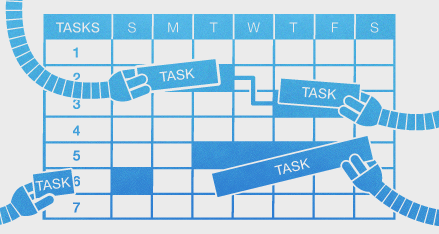 Naturally, this affects Gigantt's automatic task scheduling. With this new information the schedules you're going to get will be a lot more realistic.
You can customize further, defining the work-week of particular people or resources. This lets you handle part-time employees, resources with special availability (e.g. available only during
weekends), and so on.

Another thing you can do is define vacation periods, for everyone or for particular people. These are days during which no tasks get scheduled.
Read all about work-calendars in our support page: Work Calendars.
Not everybody works the same days and hours. Work calendars let you define, first, your organization's standard work-week. That is, which days are working days and how many hours people work in general?
Naturally, this affects Gigantt's automatic task scheduling. With this new information the schedules you're going to get will be a lot more realistic. You can customize further, defining the work-week of particular people or resources. This lets you handle part-time employees, resources with special availability (e.g. available only during
weekends), and so on.
Another thing you can do is define vacation periods, for everyone or for particular people. These are days during which no tasks get scheduled.
Read all about work-calendars in our support page: Work Calendars.
Wednesday, December 19, 2012
Fire your most irreplaceable team members now
The most replaceable employees are the irreplaceable ones.
Let's take a moment to parse this sentence carefully. It's true in two ways.
An employee that voluntarily shares his knowledge with his coworkers, keeps nothing solely in his head, but rather strives to document publicly the knowledge and know-how he acquires on the job, is the most precious employee the company has. He knows that if he quits tomorrow, he is totally replaceable, in the sense that there's nothing he would need to teach his replacement - it's all there in the open. No knowledge is permanently lost. This is the guy you never actually want to replace.
An employee that hoards knowledge and positions himself as the omniscient guru, to whom all must come for answers, should be the first one fired. Sometimes people do this unintentionally. They don't see a problem with having all the answers. That's why managers need to instill into them the following mantra: the stuff you keep in your head should only be a copy.
Let's call it brain cache.
What you bring to the table as an employee is your attitude, your ability to reason, make smart decisions and learn. Everything else is basically brain cache. A cache is a powerful thing, mind you. But if the problem of replacing an employee boils down to warming up a new brain cache - that's at least manageable.
p.s.
I'm trying a new format in this post: highlighting sentences for readers to quickly skim the text. The idea is that if you read only the highlighted text you should get a succinct version of the post, but still in sentences that make sense together and form a continuous and coherent version of the text on their own.
As an avid blog follower, I find myself practically always skimming posts - sometimes hundreds each day. I don't really read any blog post word-for-word unless I know for sure it's interesting enough. Especially wordy ones (like this one). There are just too many of them. I suspect I'm not the only one who does this. If you're reading this (and you're able to see the subtle HTML formatting I've applied), I'd be interested to hear you opinion. Is this actually helping you read, or is it just annoying?
Let's take a moment to parse this sentence carefully. It's true in two ways.
An employee that voluntarily shares his knowledge with his coworkers, keeps nothing solely in his head, but rather strives to document publicly the knowledge and know-how he acquires on the job, is the most precious employee the company has. He knows that if he quits tomorrow, he is totally replaceable, in the sense that there's nothing he would need to teach his replacement - it's all there in the open. No knowledge is permanently lost. This is the guy you never actually want to replace.
An employee that hoards knowledge and positions himself as the omniscient guru, to whom all must come for answers, should be the first one fired. Sometimes people do this unintentionally. They don't see a problem with having all the answers. That's why managers need to instill into them the following mantra: the stuff you keep in your head should only be a copy.
Let's call it brain cache.
What you bring to the table as an employee is your attitude, your ability to reason, make smart decisions and learn. Everything else is basically brain cache. A cache is a powerful thing, mind you. But if the problem of replacing an employee boils down to warming up a new brain cache - that's at least manageable.
p.s.
I'm trying a new format in this post: highlighting sentences for readers to quickly skim the text. The idea is that if you read only the highlighted text you should get a succinct version of the post, but still in sentences that make sense together and form a continuous and coherent version of the text on their own.
As an avid blog follower, I find myself practically always skimming posts - sometimes hundreds each day. I don't really read any blog post word-for-word unless I know for sure it's interesting enough. Especially wordy ones (like this one). There are just too many of them. I suspect I'm not the only one who does this. If you're reading this (and you're able to see the subtle HTML formatting I've applied), I'd be interested to hear you opinion. Is this actually helping you read, or is it just annoying?
Monday, December 17, 2012
Scheduled System Maintenance - Sat. Dec. 22
Gigantt will undergo a scheduled upgrade this Saturday (2012-12-22) at 05:00 UTC. There will probably be a few minutes of inavailability. We'll update our status on Twitter in case there are any surprises: @giganttweets
Check back with us afterwards for some fancy new feature announcements.
Tuesday, December 11, 2012
Planning Release Cycles - Behind The Scenes of Gigantt's Development
We try to release a new major version of Gigantt every month. Sometimes it takes us longer, depending on how challenging the new feature is.
Our development effort normally runs parallel to our QA testing effort in a series of release cycles. Here is the actual snapshot of our next version's progress.
Green is what's already done. As you can see, we break down our work to a few chunks. First the big stuff - the major new features. When that's finished and tested by developers, the QA team can already have at it, to try and flush out the most outrageous bugs as early as possible (and also provide us with some feedback in general). While the major features are being tested, we start working on minor ones and on our bug backlog. Finally, we reach the stabilization phase in which we do nothing but fix bugs that QA has found.
And so it goes every month or so. Develop, stabilize and repeat. What you see above is a good way to organize any project that follows an iterative flow. Things are nice and parallel when they need to be. Also a great way to plan scrum sprints.
Soon we'll be releasing a much requested feature: team calendars (i.e. vacations, part-time workers). As you can see above, we just have to stabilize it a bit more before we unleash it on the world.
If you're managing a software project, try organizing it now in Gigantt. It takes just a few minutes to get started.
Our development effort normally runs parallel to our QA testing effort in a series of release cycles. Here is the actual snapshot of our next version's progress.
 |
| Gigantt v0.21 as of 2012-12-12 |
And so it goes every month or so. Develop, stabilize and repeat. What you see above is a good way to organize any project that follows an iterative flow. Things are nice and parallel when they need to be. Also a great way to plan scrum sprints.
Soon we'll be releasing a much requested feature: team calendars (i.e. vacations, part-time workers). As you can see above, we just have to stabilize it a bit more before we unleash it on the world.
If you're managing a software project, try organizing it now in Gigantt. It takes just a few minutes to get started.
Wednesday, December 5, 2012
Work-Decibels - How Projects Should Be Estimated
 Try this experiment: Blindfold yourself, put your hands flat out and ask someone to place one 5gr cookie in your left hand and two 5gr cookies in your right hand (on top of each other, so you can't feel how many there are by touch). Now there's 10gr of weight on your right hand and 5gr on your left. Can you tell which is heavier? Science tells us you shouldn't have a problem telling apart 10gr from 5gr.
Now do the same with a package of cookies. Put a 100gr package in each hand, after removing one cookie from one of them. The weight difference between them is still 5gr - but it's going to be much harder for you to say which is heavier. Sensing the difference between 100gr and 95gr is much harder than between 10gr and 5gr.
Lastly, if you try it with 200gr and 195gr, you should no longer be able to tell them apart.
Our perception works largely on a logarithmic scale. It's not just true for weight, but also for loudness of sound, brightness of vision and other kinds of perception (distance, taste and more). The "bigger" things are, the more difference between them it takes for us to be able to tell them apart, a phenomenon described by the Weber-Fecher law and Stevens' power law.
So what does all this have to do with project management? I'd argue that this quirk of perception and estimation applies to estimating tasks in a project as well. We're usually quite good at estimating whether a task is going to take one or two days, but estimating whether a task is going to take 30 or 31 days is nearly impossible.
That's why we at Gigantt think t-shirt sized task estimates are a very good idea for projects. It makes little difference if a day-long task actually takes 8 or 9 hours, so you may as well avoid talking about hours in such cases and just say one day. Similarly, if a much bigger task is going to take 20 or 23 days there's no real difference and you're unlikely to be able to nail that estimation so accurately, anyway. So just say it's going to take one (work) month.
(Of course, you shouldn't be estimating anything in such large chunks. The right thing to do is break 20-day tasks into smaller pieces and estimate them individually, in the process also realizing how much unexpected work actually goes into them, and thus getting much more reliable aggregate estimates.)
The Weber-Fechner point of all this is to avoid comparing things of similar magnitude. Those are too hard to tell apart. If you limit yourself to t-shirt sized estimates, like [1 hour, 5 hours, 1 day, 3 days, 1 week, 2 weeks, 1 month, etc.] you're going to round off a lot of estimation errors and make your life much easier. It also makes life easier within the organization. You won't need to haggle over whether something should take 9 or 10 days - just call it 2 weeks and move on. Everybody can agree on whether something is going to take one or two weeks. Your under- and over-estimations will even out.
I think the reason we're such poor estimators has something to do with our logarithmic perception. If you're listening to music at 50db and someone increases the volume to 60db it feels like a 20% increase in magnitude, but it's really a 10x increase (1000%). Decibels are a logarithmic scale, and that's similar to how our hearing works when it comes to stimuli of different magnitudes. That's why Decibels are such a useful scale to us. I'm saying we need a similar scale for estimating work. We need work-decibels. When faced with estimating a new task - something you haven't done before - a lot of the times you would try to look back at something similar and say "well, this looks like 20% more work" and a lot of the times you're going to be dead wrong. You're just not that good at comparing things of similar scale.
Thursday, November 8, 2012
Is log-in with Facebook/Google better than with normal passwords?
You know how there are websites where you don't have to think of a new username and password when you register, and you can just log in with Facebook or Google instead? That's called SSO - Single Sign On, and there's a huge trend towards adopting this approach all over the web.

The arguments in favor seem strong:
Or is it?
Pam, pam, paaaaaam!
One of the popular proponents of SSO is Stack Overflow. From the day it launched, Stack Overflow never offered a traditional log in option - only SSO. Here's what their log-in screen looks like:
 So, which account did we sign-up with to Stack Overflow? Was it the Google or Facebook option? What happens if I choose the wrong one? Would a new account be created? Are these the sort of questions you need your users to be asking themselves constantly?
In short - SSO is not that easy, at least when there's more than one SSO option to choose from. More choice isn't always good. Too much of it can lead to inaction - users turning away.
There isn't always that much choice. Here's meetup.com's log in page:
 Granted, I still need to remember if I registered with my own credentials or with Facebook, but I guess that's a bit easier to remember.
At least SSO is still faster, right? You don't have to type anything or try every one of your different passwords till you get the right one. But then again, doesn't the browser already do that? Every browser now offers to remember your log in details for you, and some even go ahead and fill out the log in form for you automatically. Browsers have become password managers, and pretty good ones at that. With a password manager working for you, logging in becomes just one click. That's actually faster than with SSO. With SSO, first you have to click on your SSO provider (click #1) and then, depending on whether or not you're already logged in to Facebook or whatever you have to also wait for their pop-up (so slow...) and either click inside it to confirm, or (worse) actually do the whole log in thing with Facebook.
So, traditional log in: 1 click.
SSO: 1 click + a whole lot of waiting for popups + potentially an additional log-in
But wait, there's more! If you really care about security and speed, you're likely using a full fledged password manager, like LastPass. LastPass doesn't just keep track of your passwords very securely, it also generates them for you - nice, long, random ones. But, most importantly, LastPass works very hard to make sure it knows how to auto-fill every bloody log in form on every bloody web site. It's not a hit-or-miss feature, like the ones inside browsers. And, if you choose, it will automatically click on the log in button for you. So if you're using LastPass you can actually skip the entire log-in process entirely. Zero clicks.
To recap: SSO - 1 click at the very minimum; Traditional log-in: 0 clicks.
SSO is actually much, much slower than traditional credentials.
And SSO isn't really more secure than using a good password manager. In either case once your main password (for Facebook/LastPass) is compromised, hackers can log in to any of your SSO accounts. Granted, more people use Facebook than LastPass, so SSO still has the upper hand in terms of ubiquity, but, with time, I believe we'll see the equivalent of LastPass built into every browser.
The last point is about implementation. Here, traditional passwords are easiest, no doubt. They're built into any decent web framework or CMS, so there's really nothing to implement. I've done both and getting SSO to work is pretty easy, but certainly not easier than traditional authentication. And as long as you're not rolling your own, you're likely using a very well tested and secure implementation, which doesn't actually store passwords - only salted hashes thereof - so hacking your site won't give hackers access to your users' other accounts.
All of this is why Gigantt has been using the traditional log in method until now, and we're not likely to change it soon. Down the line - maybe, if it actually helps us reach more users. But we probably won't offer more than one SSO option and we'll almost certainly always keep the traditional log-in option around.
The arguments in favor seem strong:
- It's easy. Users don't want to generate a new set of credentials. SSO will thus cause less users to drop out before registering.
- It's secure. The more credentials a user has to keep track off, the less secure his online world is going to be, since he'll likely choose the same easy-to-remember passwords over and over.
- It's faster. One less thing to do to register. Just click on the big, familiar Facebook button, then up comes a pop-up from Facebook asking for permission, and you're done.
- It's ubiquitous. Basically everybody already has a Facebook/Gmail account.
- It's less headache. You're not storing user credentials, so the townspeople won't come after you with pitchforks when you get hacked.
- It's easy to implement. In fact, there ain't much to implement, since it's been done a thousand times before and is offered as a library or a service.
Or is it?
Pam, pam, paaaaaam!
One of the popular proponents of SSO is Stack Overflow. From the day it launched, Stack Overflow never offered a traditional log in option - only SSO. Here's what their log-in screen looks like:

In short - SSO is not that easy, at least when there's more than one SSO option to choose from. More choice isn't always good. Too much of it can lead to inaction - users turning away.
There isn't always that much choice. Here's meetup.com's log in page:
At least SSO is still faster, right? You don't have to type anything or try every one of your different passwords till you get the right one. But then again, doesn't the browser already do that? Every browser now offers to remember your log in details for you, and some even go ahead and fill out the log in form for you automatically. Browsers have become password managers, and pretty good ones at that. With a password manager working for you, logging in becomes just one click. That's actually faster than with SSO. With SSO, first you have to click on your SSO provider (click #1) and then, depending on whether or not you're already logged in to Facebook or whatever you have to also wait for their pop-up (so slow...) and either click inside it to confirm, or (worse) actually do the whole log in thing with Facebook.
So, traditional log in: 1 click.
SSO: 1 click + a whole lot of waiting for popups + potentially an additional log-in
But wait, there's more! If you really care about security and speed, you're likely using a full fledged password manager, like LastPass. LastPass doesn't just keep track of your passwords very securely, it also generates them for you - nice, long, random ones. But, most importantly, LastPass works very hard to make sure it knows how to auto-fill every bloody log in form on every bloody web site. It's not a hit-or-miss feature, like the ones inside browsers. And, if you choose, it will automatically click on the log in button for you. So if you're using LastPass you can actually skip the entire log-in process entirely. Zero clicks.
To recap: SSO - 1 click at the very minimum; Traditional log-in: 0 clicks.
SSO is actually much, much slower than traditional credentials.
And SSO isn't really more secure than using a good password manager. In either case once your main password (for Facebook/LastPass) is compromised, hackers can log in to any of your SSO accounts. Granted, more people use Facebook than LastPass, so SSO still has the upper hand in terms of ubiquity, but, with time, I believe we'll see the equivalent of LastPass built into every browser.
The last point is about implementation. Here, traditional passwords are easiest, no doubt. They're built into any decent web framework or CMS, so there's really nothing to implement. I've done both and getting SSO to work is pretty easy, but certainly not easier than traditional authentication. And as long as you're not rolling your own, you're likely using a very well tested and secure implementation, which doesn't actually store passwords - only salted hashes thereof - so hacking your site won't give hackers access to your users' other accounts.
All of this is why Gigantt has been using the traditional log in method until now, and we're not likely to change it soon. Down the line - maybe, if it actually helps us reach more users. But we probably won't offer more than one SSO option and we'll almost certainly always keep the traditional log-in option around.
Thursday, November 1, 2012
Due Dates / Deadlines (Feature Announcement)
I'm glad to announce we've released the much awaited due-date feature (a.k.a. deadlines). It took us a while to implement; we wanted it to be just right.
This is what it looks like when a task has a due date defined for it.
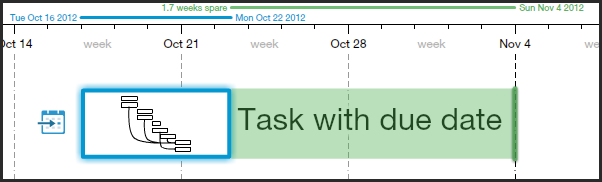
Green means relax - you got some spare time.
When the due date approaches, it turns yellow:
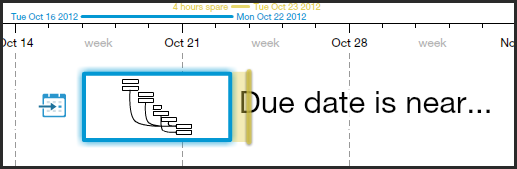 Better start paying attention... you don't want your task to be late:
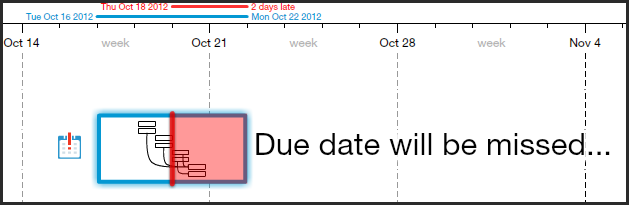
That's just a tiny sample of the different ways we visualize due-dates. Read more about this feature here.
Go ahead and take her out for a spin. Let us know what you think.
This is what it looks like when a task has a due date defined for it.
Green means relax - you got some spare time.
When the due date approaches, it turns yellow:
That's just a tiny sample of the different ways we visualize due-dates. Read more about this feature here.
Go ahead and take her out for a spin. Let us know what you think.
Wednesday, October 24, 2012
Users Don't Care About Bug Fixes
This, in itself, is a good thing. Problem is, people who write these lists often confuse "what's new" with "what we've been working on since the last version". Users (and this is a gross generalization, but still) do not care how your team has been spending its time between versions. They care about what's new. Shiny new things.
The worst offense in this respect is including bug fixes as part of the release history. Sure, you've spent 80% of your time fixing bugs and 20% actually adding new functionality - but users don't care. Yes, yes, of course some do, like the ones that reported some of the bugs, but they're really the exception. Your release history is a marketing document aimed at getting more people to upgrade to the latest version and convert inactive users to active ones. Most users could care less about how many bugs you've fixed along the way. In fact, nice going, advertising the fact that you have shipped so many bugs to begin with... Sure, it's reality, but reality isn't the point. You're not logging, you're advertising.
So don't include a list of every single bug you've fixed. For God's sake don't include bug IDs! But most pointless of all is to just write "various bug fixes". O... k... what's the value in that? Why are you sharing this with users? It's not their fault that you only managed to squeeze one new feature into this release. Adding this "but we really worked hard to fix a lot of problems you may not even have noticed" excuse is just silly.
We've done this in the past, I'll admit. No more. If you can spin a bug fix as a positive improvement to functionality (e.g. things run faster), then go ahead - but don't force it.
One exception to this rule is for mega-bugs. Bugs that were so horrible, they caused half your users to flee your product. It makes sense to mention those, but really only those.
Think of every addition to the release history as adding another line to your product's CV.
What goes into a CV?
Good idea: mention the ways you've grown during your last job.
Bad idea: mention that anger management course they forced you to take. That's the sort of "bug fix" you can keep to yourself.
Wednesday, October 17, 2012
New Feature: Export Your Projects
Sadly, not every single person in the world uses Gigantt. Not yet.
It's a travesty.
But don't despair, early adopter! You can now export your plans from Gigantt to a variety of popular file formats, which you can then share with your clients or co-workers who haven't yet jumped on board the Gigantt train.
Here are the export formats we currently support:
Microsoft Project (XML) - The ubiquitous project-management tool we all love to hate.
Excel (CSV) - Comma Separated Values. A simple textual format that can be opened by Excel or any text editor.
Image (PNG) - This is like printing your screen into an image that you can then attach to emails/PowerPoint/etc. You even get a chance to preview your plan and tweak it before saving it as an image file.
HTML - Gigantt will export your plan into a single, interactive HTML file in the shape of a task-tree. You can then view it in any browser.
JSON - The "source" format Gigantt uses internally to save your projects. It's a very programmer-friendly text format. Software developers should find it easy to use for developing their own export formats.
DOT - This one is just for fun. It exports the "shape" of your plan so that it can be rendered as a DAG in GraphViz. This is a very technical format that only software developers find relevant.
These are the formats we're starting with. We plan to add more. Go ahead and try it out. If you'd like us to add support for any specific format please let us know.
It's a travesty.
But don't despair, early adopter! You can now export your plans from Gigantt to a variety of popular file formats, which you can then share with your clients or co-workers who haven't yet jumped on board the Gigantt train.
Here are the export formats we currently support:
Microsoft Project (XML) - The ubiquitous project-management tool we all love to hate.
Excel (CSV) - Comma Separated Values. A simple textual format that can be opened by Excel or any text editor.
Image (PNG) - This is like printing your screen into an image that you can then attach to emails/PowerPoint/etc. You even get a chance to preview your plan and tweak it before saving it as an image file.
 |
| image preview |
HTML - Gigantt will export your plan into a single, interactive HTML file in the shape of a task-tree. You can then view it in any browser.
JSON - The "source" format Gigantt uses internally to save your projects. It's a very programmer-friendly text format. Software developers should find it easy to use for developing their own export formats.
DOT - This one is just for fun. It exports the "shape" of your plan so that it can be rendered as a DAG in GraphViz. This is a very technical format that only software developers find relevant.
These are the formats we're starting with. We plan to add more. Go ahead and try it out. If you'd like us to add support for any specific format please let us know.
Wednesday, October 10, 2012
It's Tasks All The Way Down...
Gigantt is a project management tool that does not know what a project is. It's all just tasks. Tasks that can contain other tasks.
It makes everything much simpler, really. You don't need to define projects, milestones or versions. It's up to you to build your task hierarchy in any way that makes sense to you.
Consequently, plans in Gigantt don't really have names. Or, more accurately, the name of the plan is just the name of its top task.
Rename it and you've renamed your plan.
Normally, when you create a new plan, the top task is assigned to you, and so is any additional sub-task you create. You're the default owner, in other words, of any top level sub-task. We've recently added a way to change this. So if you want to assign the top task of the plan to somebody else you can do it by visiting the This Plan dialog inside the menu.
This comes in handy, for example, when the person who created the plan is no longer part of the project.
Our fractal approach to projects, where it's all just tasks containing other tasks, makes Gigantt simpler to learn and more flexible.
 |
| " |
Consequently, plans in Gigantt don't really have names. Or, more accurately, the name of the plan is just the name of its top task.
 |
| Renaming a plan |
Normally, when you create a new plan, the top task is assigned to you, and so is any additional sub-task you create. You're the default owner, in other words, of any top level sub-task. We've recently added a way to change this. So if you want to assign the top task of the plan to somebody else you can do it by visiting the This Plan dialog inside the menu.
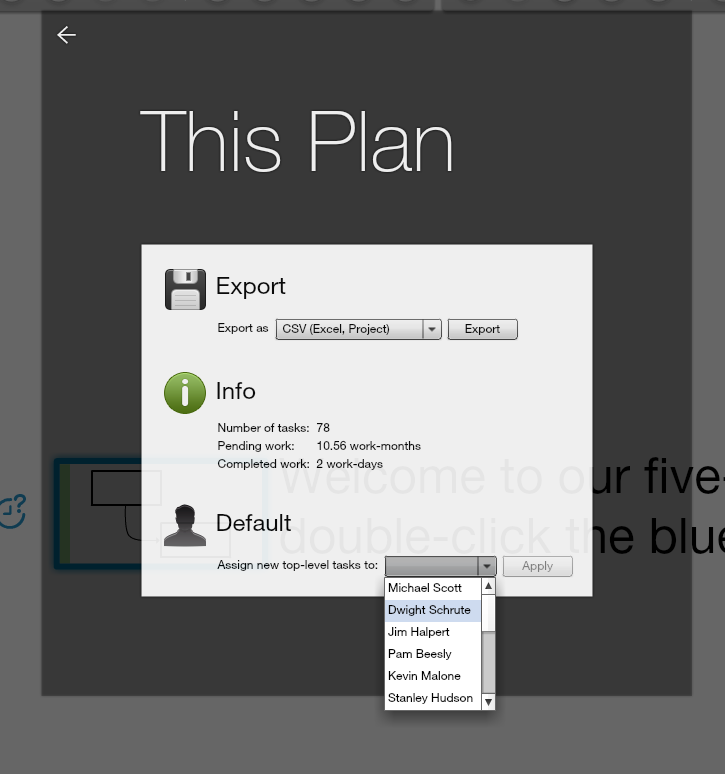 |
| Changing the default owner of top-level tasks |
Our fractal approach to projects, where it's all just tasks containing other tasks, makes Gigantt simpler to learn and more flexible.
Subscribe to:
Posts (Atom)