Wednesday, October 24, 2012

Users Don't Care About Bug Fixes

We were trained to always write a "what's new" list when we ship a new version of our product. User have come to expect these lists, as you see them even in app stores. Each app update comes with a "release history" that's supposed to tell you why you should bother updating.

This, in itself, is a good thing. Problem is, people who write these lists often confuse "what's new" with "what we've been working on since the last version". Users (and this is a gross generalization, but still) do not care how your team has been spending its time between versions. They care about what's new. Shiny new things.

The worst offense in this respect is including bug fixes as part of the release history. Sure, you've spent 80% of your time fixing bugs and 20% actually adding new functionality - but users don't care. Yes, yes, of course some do, like the ones that reported some of the bugs, but they're really the exception. Your release history is a marketing document aimed at getting more people to upgrade to the latest version and convert inactive users to active ones. Most users could care less about how many bugs you've fixed along the way. In fact, nice going, advertising the fact that you have shipped so many bugs to begin with... Sure, it's reality, but reality isn't the point. You're not logging, you're advertising.

So don't include a list of every single bug you've fixed. For God's sake don't include bug IDs! But most pointless of all is to just write "various bug fixes". O... k... what's the value in that? Why are you sharing this with users? It's not their fault that you only managed to squeeze one new feature into this release. Adding this "but we really worked hard to fix a lot of problems you may not even have noticed" excuse is just silly.

We've done this in the past, I'll admit. No more. If you can spin a bug fix as a positive improvement to functionality (e.g. things run faster), then go ahead - but don't force it.

One exception to this rule is for mega-bugs. Bugs that were so horrible, they caused half your users to flee your product. It makes sense to mention those, but really only those. 

Think of every addition to the release history as adding another line to your product's CV. 
What goes into a CV? 
Good idea: mention the ways you've grown during your last job.
Bad idea: mention that anger management course they forced you to take. That's the sort of "bug fix" you can keep to yourself.

Wednesday, October 17, 2012

New Feature: Export Your Projects

Sadly, not every single person in the world uses Gigantt. Not yet. 
It's a travesty.
But don't despair, early adopter! You can now export your plans from Gigantt to a variety of popular file formats, which you can then share with your clients or co-workers who haven't yet jumped on board the Gigantt train.

Here are the export formats we currently support:

Microsoft Project (XML) - The ubiquitous project-management tool we all love to hate.

Excel (CSV) - Comma Separated Values. A simple textual format that can be opened by Excel or any text editor.

Image (PNG) - This is like printing your screen into an image that you can then attach to emails/PowerPoint/etc. You even get a chance to preview your plan and tweak it before saving it as an image file.
image preview


HTML - Gigantt will export your plan into a single, interactive HTML file in the shape of a task-tree. You can then view it in any browser.

JSON - The "source" format Gigantt uses internally to save your projects. It's a very programmer-friendly text format. Software developers should find it easy to use for developing their own export formats.

DOT - This one is just for fun. It exports the "shape" of your plan so that it can be rendered as a DAG in GraphViz. This is a very technical format that only software developers find relevant.

These are the formats we're starting with. We plan to add more. Go ahead and try it out. If you'd like us to add support for any specific format please let us know.


Wednesday, October 10, 2012

It's Tasks All The Way Down...

Gigantt is a project management tool that does not know what a project is. It's all just tasks. Tasks that can contain other tasks.
"Turtles Tasks all the way down"
It makes everything much simpler, really. You don't need to define projects, milestones or versions. It's up to you to build your task hierarchy in any way that makes sense to you.

Consequently, plans in Gigantt don't really have names. Or, more accurately, the name of the plan is just the name of its top task. 
Renaming a plan
Rename it and you've renamed your plan.

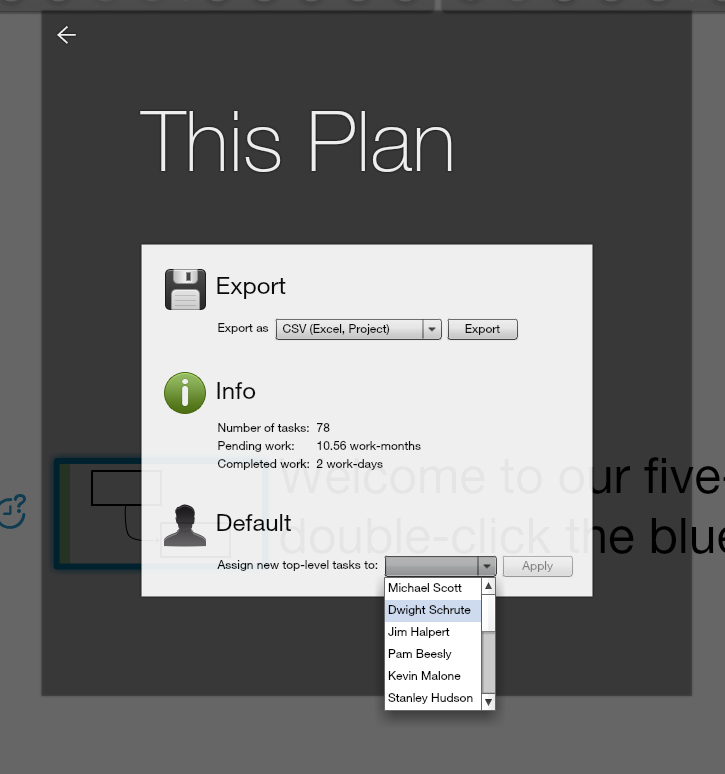
Normally, when you create a new plan, the top task is assigned to you, and so is any additional sub-task you create. You're the default owner, in other words, of any top level sub-task. We've recently added a way to change this. So if you want to assign the top task of the plan to somebody else you can do it by visiting the This Plan dialog inside the menu.

Changing the default owner of top-level tasks
This comes in handy, for example, when the person who created the plan is no longer part of the project.

Our fractal approach to projects, where it's all just tasks containing other tasks, makes Gigantt simpler to learn and more flexible.

Sunday, September 30, 2012

Wiggle

Our latest release of Gigantt introduces a cute little feature called wiggle.

The wiggle button lets you rearrange the tasks you see on screen. Each click on it cycles through a different method of arranging tasks and drawing arrows between them.


See, there's no one perfect way to layout your tasks on screen. Plans are sometimes complex and have odd shapes. Just like no one view is always what you want to see, no particular layout is always the clearest way to visualize your tasks.

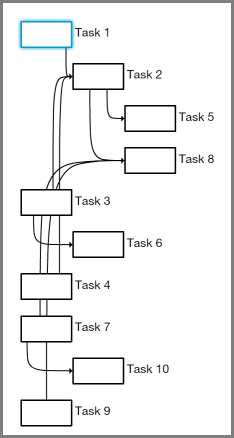
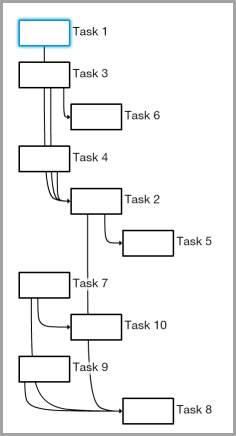
For example, the following plan has 10 tasks with all kinds of connections between them.

As you can see, some of the arrows cross each other in confusing ways and pass "through" tasks on their way. Not so easy to tell what connects to what.

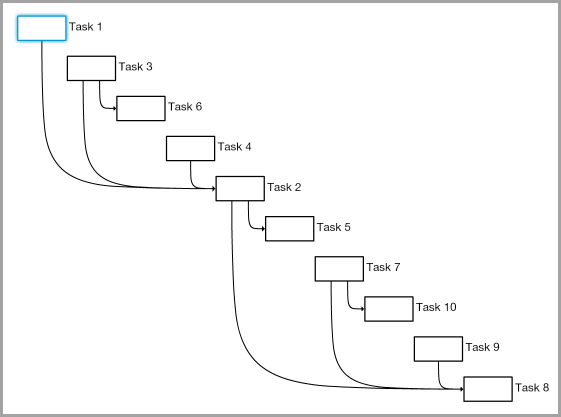
Now let's cycle through some possible wiggles to see alternative ways of laying out the same plan.

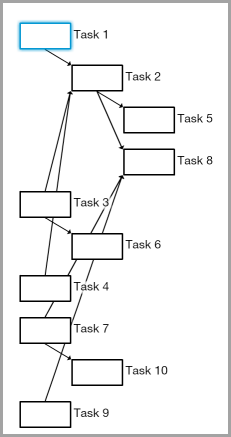
One option is to use straight arrows instead of bendy ones:

That's already an improvement. Making the arrows are less parallel makes them easier to distinguish from one another. Another wiggle option is to leave the arrows the way they were but change the order of tasks on screen:


That's a different sort of improvement. The example above uses a different method of ordering tasks called a topological sort (programmers may have observed that the default method is a DFS).

But still some arrows intersect unrelated tasks on their way. Good thing there's another wiggle option that makes sure no two tasks overlap horizontally. Here's what it looks like:


Arrows are easy to follow in the example above, but, of course, this comes at the cost of making it harder to tell which tasks we can start with (i.e. have no prerequisites). 

There are more wiggle options than we've shown here. This video cycles through all the currently available options:


Bottom line - you don't always need wiggles, but every now and then they can take a complex-looking plan and make it look simpler. No layout method is perfect since plans come in all shapes and sizes. Some wiggle room is a good idea.

Take a moment to log in to Gigantt and try it out.

Sunday, September 23, 2012

What's On The Menu

We've been listening to your feedback and tallying up the votes. Today we've released a version of Gigantt with quite a few new features. We'll be blogging about each new feature in the weeks to come. Today we just want to draw your attention to one big design change: Gigantt now has a zoom menu system.

Behold!


Here's what it looks like in action:


You can find plenty of new features inside. Go try it out.

Friday, July 13, 2012

Santa Claus, Project Manager

Seasoned project managers know all about the various ways project tasks can depend on each other. Finish-to-start, start-to-start, and so on. But do we really need all these different dependency types? Turns out it really depends on your PM tools. With Gigantt, for example, you don't.


But first let's recap on the different types of dependencies. Wikipedia actually does a pretty good job at it. Here's a shorter version. Also this version uses Santa Claus and is thus inherently better.

Finish-To-Start

Example: Santa can't deliver toys before his elves make them.

Start-To-Start

Example: Santa can't start performing quality inspection on toys before his elves start making them.

Finish-To-Finish

Same example: Santa can't finish inspecting toys before his elves finish making them.

Start-To-Finish

Example: A senior elf wants to retire, but first he has to spend some time training a new elf in his place. The new elf's training may go on after the senior elf retires, but there has to be some period of overlap.
This last example (F2S) also introduces a new variable into the mix - the amount of time those tasks must overlap. e.g. we could say that a retiring elf must train his replacement for at least a week.


Aside, then, from the purely logical connection between tasks, we can also talk about how they relate to each other over time. The terms used in such cases are normally lead and lag.


Lag & Lead

Santa has to rest for a week after delivering toys before he can start working on next year's toys.


The time between tasks is called a lag. A lead, on the other hand, refers to the period of time when tasks overlap. You can sometimes think of it as a negative lag. 


Example: Santa can start inspecting toys after the elves start making them. However, Santa first has to let the elves actually finish making at least a few toys before there are any toys to inspect, right? So we can define a one day lead between the time they start making their toys and the time he starts inspecting them.


Real easy to get a headache from all this stuff... Why can't we just have one simple type of dependency to rule them all?


The Gigantt Way

When Gigantt draws arrows between tasks it always means one thing - a classic Finish-to-Start connection. Most of the time that's enough. 


Then of course you can put tasks inside other tasks, which is basically a S2S or F2F dependency, although an implicit one. If a task contains other tasks then they can only start once their container starts, and their container can only finish once they're finished.
These are simple, intuitive dependencies and we find that they'll do the job most of the time. But every now and then we get questions, usually from experienced project managers, who miss all those other fancy dependencies and their lags and leads and what have you.


Could Gigantt still be useful if it doesn't let you define a negative lag in a finish-to-finish dependency? The answer is almost always "break up your tasks to smaller ones and you won't need anything more". In fact, if you do it this way you'll have a better plan, plus you won't need to bother with complicated dependency types. 


Let's see some example.


Case study: Negative lag in a Finish-To-Finish Dependency

A user asked us how he could model the following work-plan in Gigantt. His project has a long design stage before development can start. However, two months before the design is finished something else needs to start - provisioning (buying equipment). He wanted something that looks like this:
We asked him to explain why exactly provisioning can start two months before design finishes. He then explained that at a certain point during the design, once "preliminary design" is finished, the team already knows what sort of equipment they're going to need, and so they can provision it. At that point the solution was clear: break the big-old design task into smaller pieces. 
Not only is the plan now simpler, it's also safer. Why safer? Because that two-month lag was really just an implicit estimate. What if preliminary design took more than 50% of the total design time? What if it took 75%? A plan that relies on some fixed two-month lag would have been out-dated. But once we break it down to smaller parts we could easily see that provisioning is going to be delayed.


Let's see how some of the Santa examples above work out with simple F2S dependencies.


Start-to-Start:

You'll recall that a few toys need to be made before inspection can start. Alright, then let's break it down a bit. We'll split the first batch of toys into its own task and let inspection start after this new task finishes.
Bam! No more S2S with a lead. We can also track how much time the first batch took and use it to adjust our estimates.

Start-to-Finish:

Arguably the weirdest dependency of them all. So let's take the training period example we used earlier. Why should there be a week's overlap? Probably because there's some basic training without which the new elf can't start working, and this is estimated at a week's time. Great, let's model it.

Conclusion

It is our experience that almost all of the time when people say they need various types of dependencies it's for prolonged tasks. Tasks that take weeks or months. Gigantt's power is in enabling you to dive in, break tasks down and uncover hidden work and risks. Once your work chunks are much smaller there really isn't much you cannot model with simple Finish-to-Start dependencies and with tasks containing other tasks.


We're not saying these features are never needed. In some cases they are. But they're always a bit harder to grasp and they complicate your PM tools needlessly. If you can think of real-world examples please share them here. We welcome the discussion. But for the time being we're going to keep Gigantt simple and stick with plain old Finish-to-Start.

Thursday, July 5, 2012

Remember IRC?

Email is evil. This isn't news. It's an information black hole that sucks away at your company's IP. The perfect organization doesn't use email at all. Kind of like the mob.
But seriously, email stinks out loud. So what can we use instead?


I've recently been struggling with this issue. Gigantt uses Google Apps for emails, calendars, some documents, and, well... that's about it. Okay, SSO as well. Google is pretty dominant as a single-sign-on provider. But I digress. I was certain Google had at least some reasonable solution for internal company discussions. Probably just have to search the Google Apps Marketplace and choose one. 


Nope.


Turns out the offerings are slim. Why is nobody doing Exchange "public folders" for Google Apps? This is begging to be implemented.


So we gave Yammer a shot. Yammer is nice. Hopefully it'll stay nice even after being acquired. Come to think of it, Microsoft might as well turn that into it's public folders 2.0. But right now it's just not that useful for discussion boards. It's more about being able to like the fact that somebody brought cake to work or released a stable version of something. It certainly has it's place, but it's not where you want to keep your precious, precious corporate discussions.


What about Google Groups? Google Groups just doesn't work well with Google Apps. Don't ask me why. I sure wish it did. But I could not for the life of me create a new Google Group with my Apps account. And besides it's really just a different way of labeling email, when you think about it.


So strike two.


Then I stumbled upon grove.io. They'll host a private IRC server for you. Real easy to get started. In all honesty it's almost just as easy to host your own server on some cloud machine, where you'll have a bit more control over things, but who has time? 

So - IRC. Remember? Gosh, it's been years. But apparently some isolated internet tribes have been using this ancient tool all this time. We gave it a try. And you know what, it's pretty f-ing great. 


Our organization is distributed. That's another way of saying we're not paying for offices. Or, more accurately, our employees are the ones paying for office space by working from home. The challenge when working from home is to walk the fine line between feeling close to each other, like you could knock on someone's office door and pop-in for a question, and still each having his own space and the ability to get work done. Also, I find it critically important to be able to listen to WHAM occasionally at high volume. Working from home accommodates this need. 


But email is horrible and way too offline/async. Chat is evanescent, ephemeral, fleeting and various other synonyms. It's just as bad at sucking away information as email. Once the chatters quit you basically have no idea what the chat they were chatting about. And it's pretty low-tech, too. Chat has like two features - send a message and set your status. That's it.


IRC, on the other hand, is a dream. You've got channels. Channels are by and large public (within the organization). You can search them. You can archive them. Everything is preserved. And you've got commands. Delicious, delicious commands. It's really programmable, configurable, hackable chat. You can make it behave a certain way when you're away, you can tell it which keywords should draw your attention with an audio "bing!" and which can be quietly ignored. You can mash it together with your source control to get commit notifications. Whatever. The point is it's a platform. But above all it just feels cool to be able to hang out in an old-school, ASCII environment. 


I realize I sound like a total newb lamer extolling all these virtues that many people have been taking advantage continuously since I last used IRC like 17 years ago, but I can't help it - I'm excited. IRC is just fun. Nostalgia is part of it, I'll admit. But I'm really optimistic about adopting this tool as a core piece of corporate gear. The baseline is a solid, tested, simple way to discuss things in real time. That, by itself, is quite a lot. But on top of it you can tweak and hack the hell out of it with your own bots and your own inner jokes and rules. I really feel I've been missing out for quite a few years. 


So go give grove.io a try. You might end up installing your own IRC server, but that first quick taste of that familiar IRC flavor is just a sign-up away, so take a shortcut and try it out (free 30 days trial).


/away playing Song Pop