Sunday, September 30, 2012

Wiggle

Our latest release of Gigantt introduces a cute little feature called wiggle.

The wiggle button lets you rearrange the tasks you see on screen. Each click on it cycles through a different method of arranging tasks and drawing arrows between them.


See, there's no one perfect way to layout your tasks on screen. Plans are sometimes complex and have odd shapes. Just like no one view is always what you want to see, no particular layout is always the clearest way to visualize your tasks.

For example, the following plan has 10 tasks with all kinds of connections between them.
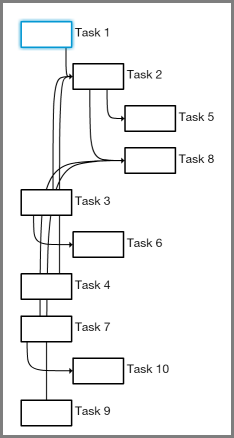
As you can see, some of the arrows cross each other in confusing ways and pass "through" tasks on their way. Not so easy to tell what connects to what.

Now let's cycle through some possible wiggles to see alternative ways of laying out the same plan.

One option is to use straight arrows instead of bendy ones:
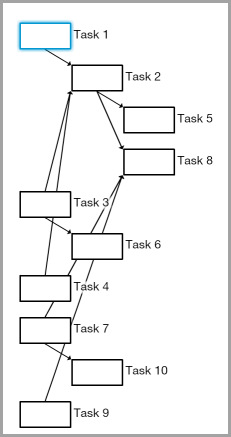
That's already an improvement. Making the arrows are less parallel makes them easier to distinguish from one another. Another wiggle option is to leave the arrows the way they were but change the order of tasks on screen:
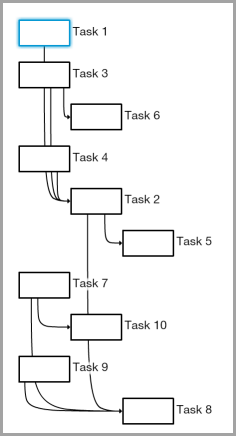

That's a different sort of improvement. The example above uses a different method of ordering tasks called a topological sort (programmers may have observed that the default method is a DFS).

But still some arrows intersect unrelated tasks on their way. Good thing there's another wiggle option that makes sure no two tasks overlap horizontally. Here's what it looks like:
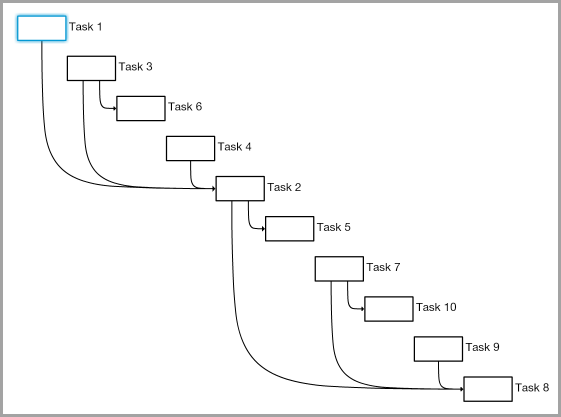

Arrows are easy to follow in the example above, but, of course, this comes at the cost of making it harder to tell which tasks we can start with (i.e. have no prerequisites). 

There are more wiggle options than we've shown here. This video cycles through all the currently available options:


Bottom line - you don't always need wiggles, but every now and then they can take a complex-looking plan and make it look simpler. No layout method is perfect since plans come in all shapes and sizes. Some wiggle room is a good idea.

Take a moment to log in to Gigantt and try it out.

Sunday, September 23, 2012

What's On The Menu

We've been listening to your feedback and tallying up the votes. Today we've released a version of Gigantt with quite a few new features. We'll be blogging about each new feature in the weeks to come. Today we just want to draw your attention to one big design change: Gigantt now has a zoom menu system.

Behold!


Here's what it looks like in action:


You can find plenty of new features inside. Go try it out.

Friday, July 13, 2012

Santa Claus, Project Manager

Seasoned project managers know all about the various ways project tasks can depend on each other. Finish-to-start, start-to-start, and so on. But do we really need all these different dependency types? Turns out it really depends on your PM tools. With Gigantt, for example, you don't.


But first let's recap on the different types of dependencies. Wikipedia actually does a pretty good job at it. Here's a shorter version. Also this version uses Santa Claus and is thus inherently better.

Finish-To-Start

Example: Santa can't deliver toys before his elves make them.

Start-To-Start

Example: Santa can't start performing quality inspection on toys before his elves start making them.

Finish-To-Finish

Same example: Santa can't finish inspecting toys before his elves finish making them.

Start-To-Finish

Example: A senior elf wants to retire, but first he has to spend some time training a new elf in his place. The new elf's training may go on after the senior elf retires, but there has to be some period of overlap.
This last example (F2S) also introduces a new variable into the mix - the amount of time those tasks must overlap. e.g. we could say that a retiring elf must train his replacement for at least a week.


Aside, then, from the purely logical connection between tasks, we can also talk about how they relate to each other over time. The terms used in such cases are normally lead and lag.


Lag & Lead

Santa has to rest for a week after delivering toys before he can start working on next year's toys.


The time between tasks is called a lag. A lead, on the other hand, refers to the period of time when tasks overlap. You can sometimes think of it as a negative lag. 


Example: Santa can start inspecting toys after the elves start making them. However, Santa first has to let the elves actually finish making at least a few toys before there are any toys to inspect, right? So we can define a one day lead between the time they start making their toys and the time he starts inspecting them.


Real easy to get a headache from all this stuff... Why can't we just have one simple type of dependency to rule them all?


The Gigantt Way

When Gigantt draws arrows between tasks it always means one thing - a classic Finish-to-Start connection. Most of the time that's enough. 


Then of course you can put tasks inside other tasks, which is basically a S2S or F2F dependency, although an implicit one. If a task contains other tasks then they can only start once their container starts, and their container can only finish once they're finished.
These are simple, intuitive dependencies and we find that they'll do the job most of the time. But every now and then we get questions, usually from experienced project managers, who miss all those other fancy dependencies and their lags and leads and what have you.


Could Gigantt still be useful if it doesn't let you define a negative lag in a finish-to-finish dependency? The answer is almost always "break up your tasks to smaller ones and you won't need anything more". In fact, if you do it this way you'll have a better plan, plus you won't need to bother with complicated dependency types. 


Let's see some example.


Case study: Negative lag in a Finish-To-Finish Dependency

A user asked us how he could model the following work-plan in Gigantt. His project has a long design stage before development can start. However, two months before the design is finished something else needs to start - provisioning (buying equipment). He wanted something that looks like this:
We asked him to explain why exactly provisioning can start two months before design finishes. He then explained that at a certain point during the design, once "preliminary design" is finished, the team already knows what sort of equipment they're going to need, and so they can provision it. At that point the solution was clear: break the big-old design task into smaller pieces. 
Not only is the plan now simpler, it's also safer. Why safer? Because that two-month lag was really just an implicit estimate. What if preliminary design took more than 50% of the total design time? What if it took 75%? A plan that relies on some fixed two-month lag would have been out-dated. But once we break it down to smaller parts we could easily see that provisioning is going to be delayed.


Let's see how some of the Santa examples above work out with simple F2S dependencies.


Start-to-Start:

You'll recall that a few toys need to be made before inspection can start. Alright, then let's break it down a bit. We'll split the first batch of toys into its own task and let inspection start after this new task finishes.
Bam! No more S2S with a lead. We can also track how much time the first batch took and use it to adjust our estimates.

Start-to-Finish:

Arguably the weirdest dependency of them all. So let's take the training period example we used earlier. Why should there be a week's overlap? Probably because there's some basic training without which the new elf can't start working, and this is estimated at a week's time. Great, let's model it.

Conclusion

It is our experience that almost all of the time when people say they need various types of dependencies it's for prolonged tasks. Tasks that take weeks or months. Gigantt's power is in enabling you to dive in, break tasks down and uncover hidden work and risks. Once your work chunks are much smaller there really isn't much you cannot model with simple Finish-to-Start dependencies and with tasks containing other tasks.


We're not saying these features are never needed. In some cases they are. But they're always a bit harder to grasp and they complicate your PM tools needlessly. If you can think of real-world examples please share them here. We welcome the discussion. But for the time being we're going to keep Gigantt simple and stick with plain old Finish-to-Start.

Thursday, July 5, 2012

Remember IRC?

Email is evil. This isn't news. It's an information black hole that sucks away at your company's IP. The perfect organization doesn't use email at all. Kind of like the mob.
But seriously, email stinks out loud. So what can we use instead?


I've recently been struggling with this issue. Gigantt uses Google Apps for emails, calendars, some documents, and, well... that's about it. Okay, SSO as well. Google is pretty dominant as a single-sign-on provider. But I digress. I was certain Google had at least some reasonable solution for internal company discussions. Probably just have to search the Google Apps Marketplace and choose one. 


Nope.


Turns out the offerings are slim. Why is nobody doing Exchange "public folders" for Google Apps? This is begging to be implemented.


So we gave Yammer a shot. Yammer is nice. Hopefully it'll stay nice even after being acquired. Come to think of it, Microsoft might as well turn that into it's public folders 2.0. But right now it's just not that useful for discussion boards. It's more about being able to like the fact that somebody brought cake to work or released a stable version of something. It certainly has it's place, but it's not where you want to keep your precious, precious corporate discussions.


What about Google Groups? Google Groups just doesn't work well with Google Apps. Don't ask me why. I sure wish it did. But I could not for the life of me create a new Google Group with my Apps account. And besides it's really just a different way of labeling email, when you think about it.


So strike two.


Then I stumbled upon grove.io. They'll host a private IRC server for you. Real easy to get started. In all honesty it's almost just as easy to host your own server on some cloud machine, where you'll have a bit more control over things, but who has time? 

So - IRC. Remember? Gosh, it's been years. But apparently some isolated internet tribes have been using this ancient tool all this time. We gave it a try. And you know what, it's pretty f-ing great. 


Our organization is distributed. That's another way of saying we're not paying for offices. Or, more accurately, our employees are the ones paying for office space by working from home. The challenge when working from home is to walk the fine line between feeling close to each other, like you could knock on someone's office door and pop-in for a question, and still each having his own space and the ability to get work done. Also, I find it critically important to be able to listen to WHAM occasionally at high volume. Working from home accommodates this need. 


But email is horrible and way too offline/async. Chat is evanescent, ephemeral, fleeting and various other synonyms. It's just as bad at sucking away information as email. Once the chatters quit you basically have no idea what the chat they were chatting about. And it's pretty low-tech, too. Chat has like two features - send a message and set your status. That's it.


IRC, on the other hand, is a dream. You've got channels. Channels are by and large public (within the organization). You can search them. You can archive them. Everything is preserved. And you've got commands. Delicious, delicious commands. It's really programmable, configurable, hackable chat. You can make it behave a certain way when you're away, you can tell it which keywords should draw your attention with an audio "bing!" and which can be quietly ignored. You can mash it together with your source control to get commit notifications. Whatever. The point is it's a platform. But above all it just feels cool to be able to hang out in an old-school, ASCII environment. 


I realize I sound like a total newb lamer extolling all these virtues that many people have been taking advantage continuously since I last used IRC like 17 years ago, but I can't help it - I'm excited. IRC is just fun. Nostalgia is part of it, I'll admit. But I'm really optimistic about adopting this tool as a core piece of corporate gear. The baseline is a solid, tested, simple way to discuss things in real time. That, by itself, is quite a lot. But on top of it you can tweak and hack the hell out of it with your own bots and your own inner jokes and rules. I really feel I've been missing out for quite a few years. 


So go give grove.io a try. You might end up installing your own IRC server, but that first quick taste of that familiar IRC flavor is just a sign-up away, so take a shortcut and try it out (free 30 days trial).


/away playing Song Pop


Thursday, May 31, 2012

Team Invites, Time Estimates and More

We're very excited to share with you three pieces of big news today.

1. Registration is open

If you haven't already you can sign up for Gigantt right now. No more waiting list. 

2. Invite people to join you

Starting from today you can freely add team members and resources to your organization.
You can assign tasks to any resource. A resource that's really a coworker can also be invited as a collaborator. This person will then be able to edit your plan alongside you.


3. Flexible time estimates

You're no longer forced to choose an estimate from a fixed set. Now you can just type your own estimate.

Go sign up.

Sunday, April 22, 2012

What's New in Gigantt

We've focused on just one thing in this release - usability. After getting tons of feedback from new users we decided to put new feature development on hold and make the existing ones easier to use.


All New Design

The new look is much cleaner and more compact:

We've gotten rid of a few buttons that users didn't really need. Now there's tons of space for actually viewing your plan - space that used to be occupied by various panels and toolbars. And of course shiny new buttons for everything.


"The Bubble"

Gigantt is all about fast keyboard shortcuts for rapid editing, but over time we've really been neglecting the mouse, and it turned out that quite a few users aren't big fans of keyboard shortcuts. So we've really streamlined the mouse. Now a simple drag operation can both create tasks and draw arrows between them.


Here's how it looks in action:


Mac Support

Gigantt is now officially supported on the Mac and is tested on both Safari and Chrome.
There isn't much difference between the PC and Mac versions, except for the keyboard shortcuts. If you're a mac user you can print out the keyboard cheat sheet.

Tons of Small Improvements

Lots of stuff that you've been asking for and we've finally implemented. Here's a very partial list:
  • You can change the estimate of several tasks at once.
  • New keyboard shortcuts
    • R: Assign to a new resource.
    • T: Change the time estimate.
    • N: Add a note to the task.
  • Double-click outside any task (on the white space) to zoom-out.
  • Double-click on an arrow to "split" it (insert an intermediate task).
If you haven't already, go sign up.

Cracking a Safe with UX

Your mission, should you choose to accept it, is to figure out the four-digit code of this safe with just one try:


With only four keys being schmutzed we know whoever punches in the code touches only 2, 5, 8 and probably 9. With four options we have just 256 codes to try.
However, since it's pretty obvious that digits aren't repeated in the code (otherwise we would not see as many as four dirty buttons), the number of combinations drops to just 24. 

But can we use our UX expertise to crack this code in less than 24 tries (at most)?

First, the rules should be made clear. In this keypad you have to first press the key button, then the four-digit code, and then the key button again. Now let's have a crack at it.

Which digit is first? That's actually really easy to guess using Fitts' law.

Fitts' law is about ergonomics - how people use machines. Specifically it's about pointing. What it says sounds almost trivial: the bigger and closer the target, the easier it is for us to point to it accurately. So if a button is bigger, it's easier for us to point to it. The same goes if a button is closer to our finger - the farther it is, the less accurate we are at pointing to it.

We can deduce from Fitts' law that the larger the dirt circle around a button, the more the finger had to travel to get to it. The button with the biggest circle of dirt is clearly 2. This means the finger that presses 2 travels the farthest distance from its initial location. Because the distance is so great the finger usually misses it quite a lot, hence the large dirt circle. So its likely that 2 is the first button pressed. The finger has to start from the key button, then travel the greatest distance to 2, and then continue to some other key. 


Great. 

Code thus far: 2 _ _ _

We're down to 6 possible combinations. But can we narrow it down even more?

Which button is next? If 8 were the second digit, followed by 9 or 5, we would expect to see a bigger dirt circle around 8 than around 5, right? Because the distance from 2 to 8 is greater than from 5 or 9 to 8. Clearly, then, the next key is 5. And now there are just two left.


Code thus far: 2 5 _ _

So which is the 3rd button: 9 or 8? 9 has the smallest dirt circle around it, so it stands to reason that the finger travels a very short distance in order to get to it. This seems to suggest that we need to press 8 and then 9. But if that's the case then why is the circle of dirt around 8 bigger than around 9? Both are pressed after adjacent buttons, after all, so shouldn't we expect them to have the same sized dirt?

Time to think about ergonomics some more. Since the key pad is mounted on a door we need to raise our hand in order to tap on it. Now it's a bit easier to move your finger sideways in this position than up and down. Why? In order to move your finger vertically you have to move your elbow, which requires your shoulder muscles to go to work. Those are some big joints. In contrast, move between horizontally adjacent buttons your elbow can almost stay in place, with only the rest of your arm moving. Try it. I'll wait for you.

See? So vertical moves are harder, and therefor we can expect buttons that are pressed after horizontally adjacent neighbors to have smaller dirt circles than those pressed after vertically adjacent neighbors.

So it's 8 and then 9.

Code: 2 5 8 9

Just one attempt.

Conclusion: Fitts' law works all over the place, not just in computer GUI.

Also: clean your damned keypads.

We used Fitts' law when we designed our new Bubble Menu interface:


The buttons inside the bubble are relatively big and since the bubble opens up wherever you start dragging from the buttons are always close to the mouse's cursor. Close and equidistant. 

So go sign up for Gigantt. Active beta users will enjoy a lifetime discount when Gigantt leaves the beta phase.