Sunday, December 23, 2012

New Feature: Work Calendar

A big new feature coming at ya today: work-calendars. 


Not everybody works the same days and hours. Work calendars let you define, first, your organization's standard work-week. That is, which days are working days and how many hours people work in general?

Naturally, this affects Gigantt's automatic task scheduling. With this new information the schedules you're going to get will be a lot more realistic. 

You can customize further, defining the work-week of particular people or resources. This lets you handle part-time employees, resources with special availability (e.g. available only during 
weekends), and so on.


Another thing you can do is define vacation periods, for everyone or for particular people. These are days during which no tasks get scheduled. 

Read all about work-calendars in our support page: Work Calendars.


Wednesday, December 19, 2012

Fire your most irreplaceable team members now

The most replaceable employees are the irreplaceable ones.

Let's take a moment to parse this sentence carefully. It's true in two ways.

An employee that voluntarily shares his knowledge with his coworkers, keeps nothing solely in his head, but rather strives to document publicly the knowledge and know-how he acquires on the job, is the most precious employee the company has. He knows that if he quits tomorrow, he is totally replaceable, in the sense that there's nothing he would need to teach his replacement - it's all there in the open. No knowledge is permanently lost. This is the guy you never actually want to replace.

An employee that hoards knowledge and positions himself as the omniscient guru, to whom all must come for answers, should be the first one fired. Sometimes people do this unintentionally. They don't see a problem with having all the answers. That's why managers need to instill into them the following mantra: the stuff you keep in your head should only be a copy. 

Let's call it brain cache.

What you bring to the table as an employee is your attitude, your ability to reason, make smart decisions and learn. Everything else is basically brain cache. A cache is a powerful thing, mind you. But if the problem of replacing an employee boils down to warming up a new brain cache -  that's at least manageable. 

p.s.

I'm trying a new format in this post: highlighting sentences for readers to quickly skim the text. The idea is that if you read only the highlighted text you should get a succinct version of the post, but still in sentences that make sense together and form a continuous and coherent version of the text on their own.
As an avid blog follower, I find myself practically always skimming posts - sometimes hundreds each day. I don't really read any blog post word-for-word unless I know for sure it's interesting enough. Especially wordy ones (like this one). There are just too many of them. I suspect I'm not the only one who does this. If you're reading this (and you're able to see the subtle HTML formatting I've applied), I'd be interested to hear you opinion. Is this actually helping you read, or is it just annoying?


Monday, December 17, 2012

Scheduled System Maintenance - Sat. Dec. 22


Gigantt will undergo a scheduled upgrade this Saturday (2012-12-22) at 05:00 UTC. There will probably be a few minutes of inavailability. We'll update our status on Twitter in case there are any surprises: @giganttweets

Check back with us afterwards for some fancy new feature announcements.

Tuesday, December 11, 2012

Planning Release Cycles - Behind The Scenes of Gigantt's Development

We try to release a new major version of Gigantt every month. Sometimes it takes us longer, depending on how challenging the new feature is.

Our development effort normally runs parallel to our QA testing effort in a series of release cycles. Here is the actual snapshot of our next version's progress.


Gigantt v0.21 as of 2012-12-12
Green is what's already done. As you can see, we break down our work to a few chunks. First the big stuff - the major new features. When that's finished and tested by developers, the QA team can already have at it, to try and flush out the most outrageous bugs as early as possible (and also provide us with some feedback in general). While the major features are being tested, we start working on minor ones and on our bug backlog. Finally, we reach the stabilization phase in which we do nothing but fix bugs that QA has found.

And so it goes every month or so. Develop, stabilize and repeat. What you see above is a good way to organize any project that follows an iterative flow. Things are nice and parallel when they need to be. Also a great way to plan scrum sprints.

Soon we'll be releasing a much requested feature: team calendars (i.e. vacations, part-time workers). As you can see above, we just have to stabilize it a bit more before we unleash it on the world.

If you're managing a software project, try organizing it now in Gigantt. It takes just a few minutes to get started.


Wednesday, December 5, 2012

Work-Decibels - How Projects Should Be Estimated

Try this experiment: Blindfold yourself, put your hands flat out and ask someone to place one 5gr cookie in your left hand and two 5gr cookies in your right hand (on top of each other, so you can't feel how many there are by touch). Now there's 10gr of weight on your right hand and 5gr on your left. Can you tell which is heavier? Science tells us you shouldn't have a problem telling apart 10gr from 5gr.


Now do the same with a package of cookies. Put a 100gr package in each hand, after removing one cookie from one of them. The weight difference between them is still 5gr - but it's going to be much harder for you to say which is heavier. Sensing the difference between 100gr and 95gr is much harder than between 10gr and 5gr.

Lastly, if you try it with 200gr and 195gr, you should no longer be able to tell them apart.

Our perception works largely on a logarithmic scale. It's not just true for weight, but also for loudness of sound, brightness of vision and other kinds of perception (distance, taste and more). The "bigger" things are, the more difference between them it takes for us to be able to tell them apart, a phenomenon described by the Weber-Fecher law and Stevens' power law.

So what does all this have to do with project management? I'd argue that this quirk of perception and estimation applies to estimating tasks in a project as well. We're usually quite good at estimating whether a task is going to take one or two days, but estimating whether a task is going to take 30 or 31 days is nearly impossible.

That's why we at Gigantt think t-shirt sized task estimates are a very good idea for projects. It makes little difference if a day-long task actually takes 8 or 9 hours, so you may as well avoid talking about hours in such cases and just say one day. Similarly, if a much bigger task is going to take 20 or 23 days there's no real difference and you're unlikely to be able to nail that estimation so accurately, anyway. So just say it's going to take one (work) month.

(Of course, you shouldn't be estimating anything in such large chunks. The right thing to do is break 20-day tasks into smaller pieces and estimate them individually, in the process also realizing how much unexpected work actually goes into them, and thus getting much more reliable aggregate estimates.)

The Weber-Fechner point of all this is to avoid comparing things of similar magnitude. Those are too hard to tell apart. If you limit yourself to t-shirt sized estimates, like [1 hour, 5 hours, 1 day, 3 days, 1 week, 2 weeks, 1 month, etc.] you're going to round off a lot of estimation errors and make your life much easier. It also makes life easier within the organization. You won't need to haggle over whether something should take 9 or 10 days - just call it 2 weeks and move on. Everybody can agree on whether something is going to take one or two weeks. Your under- and over-estimations will even out.

I think the reason we're such poor estimators has something to do with our logarithmic perception. If you're listening to music at 50db and someone increases the volume to 60db it feels like a 20% increase in magnitude, but it's really a 10x increase (1000%). Decibels are a logarithmic scale, and that's similar to how our hearing works when it comes to stimuli of different magnitudes. That's why Decibels are such a useful scale to us. I'm saying we need a similar scale for estimating work. We need work-decibels. When faced with estimating a new task - something you haven't done before - a lot of the times you would try to look back at something similar and say "well, this looks like 20% more work" and a lot of the times you're going to be dead wrong. You're just not that good at comparing things of similar scale.

Thursday, November 8, 2012

Is log-in with Facebook/Google better than with normal passwords?

You know how there are websites where you don't have to think of a new username and password when you register, and you can just log in with Facebook or Google instead? That's called SSO - Single Sign On, and there's a huge trend towards adopting this approach all over the web.


The arguments in favor seem strong: 
  • It's easy. Users don't want to generate a new set of credentials. SSO will thus cause less users to drop out before registering.
  • It's secure. The more credentials a user has to keep track off, the less secure his online world is going to be, since he'll likely choose the same easy-to-remember passwords over and over.
  • It's faster. One less thing to do to register. Just click on the big, familiar Facebook button, then up comes a pop-up from Facebook asking for permission, and you're done.
  • It's ubiquitous. Basically everybody already has a Facebook/Gmail account.
  • It's less headache. You're not storing user credentials, so the townspeople won't come after you with pitchforks when you get hacked.
  • It's easy to implement. In fact, there ain't much to implement, since it's been done a thousand times before and is offered as a library or a service.
So, easiest decision ever, right? Our new website shall be a beacon of progress, relying only on SSO for authentication.

Or     is      it?
Pam, pam, paaaaaam!

One of the popular proponents of SSO is Stack Overflow. From the day it launched, Stack Overflow never offered a traditional log in option - only SSO. Here's what their log-in screen looks like:
So, which account did we sign-up with to Stack Overflow? Was it the Google or Facebook option? What happens if I choose the wrong one? Would a new account be created? Are these the sort of questions you need your users to be asking themselves constantly?

In short - SSO is not that easy, at least when there's more than one SSO option to choose from. More choice isn't always good. Too much of it can lead to inaction - users turning away.

There isn't always that much choice. Here's meetup.com's log in page:
Granted, I still need to remember if I registered with my own credentials or with Facebook, but I guess that's a bit easier to remember.

At least SSO is still faster, right? You don't have to type anything or try every one of your different passwords till you get the right one. But then again, doesn't the browser already do that? Every browser now offers to remember your log in details for you, and some even go ahead and fill out the log in form for you automatically. Browsers have become password managers, and pretty good ones at that. With a password manager working for you, logging in becomes just one click. That's actually faster than with SSO. With SSO, first you have to click on your SSO provider (click #1) and then, depending on whether or not you're already logged in to Facebook or whatever you have to also wait for their pop-up (so slow...) and either click inside it to confirm, or (worse) actually do the whole log in thing with Facebook.

So, traditional log in: 1 click.
SSO: 1 click + a whole lot of waiting for popups + potentially an additional log-in

But wait, there's more! If you really care about security and speed, you're likely using a full fledged password manager, like LastPass. LastPass doesn't just keep track of your passwords very securely, it also generates them for you - nice, long, random ones. But, most importantly, LastPass works very hard to make sure it knows how to auto-fill every bloody log in form on every bloody web site. It's not a hit-or-miss feature, like the ones inside browsers. And, if you choose, it will automatically click on the log in button for you. So if you're using LastPass you can actually skip the entire log-in process entirely. Zero clicks.

To recap: SSO - 1 click at the very minimum; Traditional log-in: 0 clicks.
SSO is actually much, much slower than traditional credentials.

And SSO isn't really more secure than using a good password manager. In either case once your main password (for Facebook/LastPass) is compromised, hackers can log in to any of your SSO accounts. Granted, more people use Facebook than LastPass, so SSO still has the upper hand in terms of ubiquity, but, with time, I believe we'll see the equivalent of LastPass built into every browser.

The last point is about implementation. Here, traditional passwords are easiest, no doubt. They're built into any decent web framework or CMS, so there's really nothing to implement. I've done both and getting SSO to work is pretty easy, but certainly not easier than traditional authentication. And as long as you're not rolling your own, you're likely using a very well tested and secure implementation, which doesn't actually store passwords - only salted hashes thereof - so hacking your site won't give hackers access to your users' other accounts.

All of this is why Gigantt has been using the traditional log in method until now, and we're not likely to change it soon. Down the line - maybe, if it actually helps us reach more users. But we probably won't offer more than one SSO option and we'll almost certainly always keep the traditional log-in option around.

Thursday, November 1, 2012

Due Dates / Deadlines (Feature Announcement)

I'm glad to announce we've released the much awaited due-date feature (a.k.a. deadlines). It took us a while to implement; we wanted it to be just right.

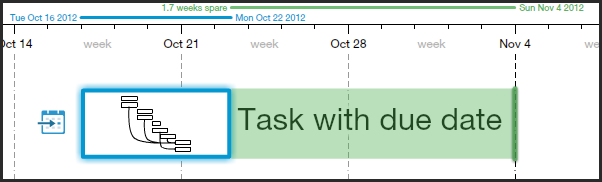
This is what it looks like when a task has a due date defined for it.


Green means relax - you got some spare time.

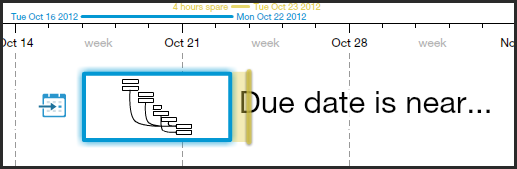
When the due date approaches, it turns yellow:
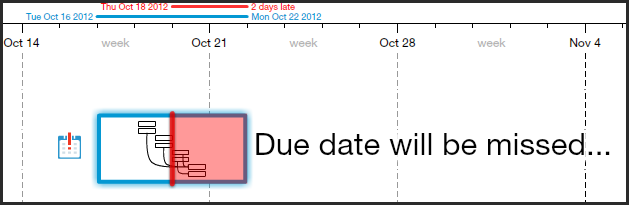
Better start paying attention... you don't want your task to be late:


That's just a tiny sample of the different ways we visualize due-dates. Read more about this feature here.

Go ahead and take her out for a spin. Let us know what you think.